
Supercharging your search engine rankings doesn’t have to drain your budget. Some of the best free SEO tools deliver the same insights you’d get from expensive software – without the premium price tag. Whether you’re a small business owner bootstrapping your marketing or just need competitive analysis without the agency overhead, these FREE tools will help you optimize your site, discover new keyword opportunities, and track performance like a pro.
Hope you enjoy  !
!
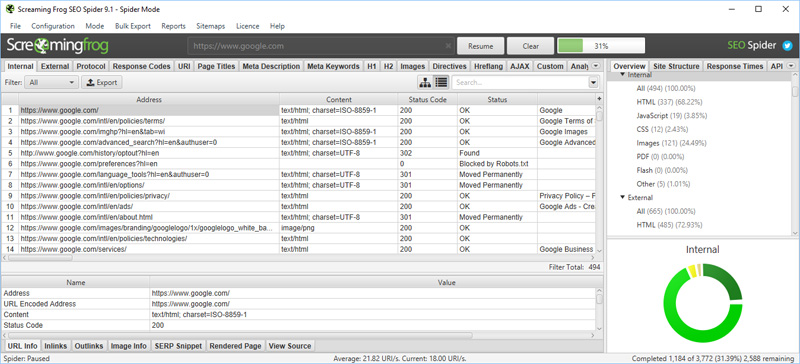
1. Screaming Frog – Your Technical SEO Foundation
What it does: This tool crawls your website like a search engine would, analyzing every URL to identify technical issues that could tank your rankings.
I fire up Screaming Frog before anything else when starting a technical audit. It’s essential for catching broken links, redirect chains, and duplicate content that Google hates. The free version handles up to 500 URLs – plenty for most small to mid-sized sites.
The catch? Knowing what to do with the data. Screaming Frog generates hundreds of rows of technical information – but interpreting it and prioritizing fixes requires experience. Miss the critical issues, and you’re wasting time on stuff that won’t move the needle.
Best for: Technical SEO audit, site structure analysis, finding crawl errors
2. Google Search Console – Data Straight From Google
What it does: Google Search Console shows you exactly how Google sees your website, including which keywords drive traffic, indexing issues, and mobile usability problems.
This platform is non-negotiable. We use it daily to monitor keyword performance, fix indexing errors, and analyze what’s actually working. The coverage report tells you why pages aren’t ranking – whether they’re excluded from the index or flagged for issues.
The reality? Most businesses look at Search Console once, get overwhelmed by the data, and never open it again. The difference between seeing the data and knowing how to act on it is where most DIY SEO falls apart.
Best for: Search performance tracking, index coverage, and identifying Google penalties
3. Google Analytics – Understanding Your Traffic
What it does: Google Analytics tracks every visitor interaction on your site, showing where traffic comes from, how users engage, and which pages convert.
From an SEO perspective, focus on organic search traffic, bounce rate, and time on site. These metrics tell you whether your keyword research is paying off and if visitors are finding what they need.
Here’s what they don’t tell you: Which metrics actually predict revenue growth. GA4 provides hundreds of data points, but most businesses track vanity metrics while overlooking the numbers that actually matter for lead generation.
Best for: Comprehensive traffic analysis, conversion tracking, user behavior insights
Not sure which tool answers which question? See our breakdown of Google Search Console vs. Google Analytics.
4. Google Keyword Planner – Free Keyword Research Tool
What it does: Google Keyword Planner provides keyword suggestions with search volume data, helping you discover what people actually search for.
While it’s designed for Google Ads, it’s one of the best free keyword research tools available. Use it to find related keywords, check search volume, and understand keyword difficulty before creating content.
The gap? Keyword Planner shows you what people search for. It doesn’t tell you which keywords will actually convert, which ones you can realistically rank for, or how to structure content to win those rankings. That’s where strategy comes in.
Best for: Keyword research, search volume data, competitive keyword analysis
5. Ahrefs Webmaster Tools – Free Backlink Checker
What it does: Ahrefs’ free version gives you access to their backlink checker, site audit tool, and basic rank tracking.
Backlinks remain one of the strongest ranking factors. This tool shows you who’s linking to your site, identifies broken links, and helps you discover link-building opportunities your competitors are using.
What it won’t do: Tell you how to actually build those backlinks. Seeing that a competitor has 500 backlinks from high-authority sites is one thing. Replicating that without getting penalized is entirely different.
Best for: Backlink analysis, competitor research, technical SEO audits
6. Moz Free SEO Tools – Domain Authority and More
What it does: Moz offers a collection of free tools, including their famous domain authority checker, keyword explorer (10 queries per month), and link-building software.
Domain authority gives you a quick way to benchmark your site against competitors. While it’s not a Google ranking factor, it’s useful for understanding relative competitive strength.
The problem? Domain authority is descriptive, not prescriptive. It tells you where you stand, not how to improve. Most businesses see a low DA score, panic, and then have no idea what to actually do about it.
Best for: Domain authority metrics, competitive insight, and quick SEO metrics
7. Ubersuggest – All-in-One Free SEO Tool
What it does: Ubersuggest combines keyword research, competitor analysis, and site audit features into a single platform.
This tool offers keyword suggestions with search volume and keyword difficulty scores. The free version limits daily searches, but it’s enough for most small business owners doing occasional research.
The execution gap: Keyword difficulty scores are educated guesses, not guarantees. A “15/100” difficulty keyword might be impossible to rank for if you don’t know how to evaluate search intent and content quality.
Best for: Keyword research tool, content ideas, competitive analysis
8. AnswerThePublic – Understanding User Intent
What it does: This tool visualizes search queries as questions, prepositions, and comparisons, helping you understand exactly what users want to know.
It’s one of my favorite keyword research tools because it shows user intent, not just search volume. Build content around the questions people actually ask, and you’ll rank for terms your competitors miss.
What it doesn’t show: How to prioritize those questions, structure content to actually rank, or convert that traffic into customers. You’ll get 200+ question variations and zero guidance on which ones matter.
Best for: Content planning, user intent research, long-tail keyword discovery
Drowning in keyword data but still not ranking? We’ll show you which keywords actually drive leads for your business.
Free Tool #14: See How AI Describes Your Business
9. Google PageSpeed Insights – Performance Optimization
What it does: This checker analyzes your webpage speed on mobile and desktop, providing specific suggestions to improve load times.
Page speed directly impacts rankings and user experience. A slow site increases bounce rate and kills conversions, no matter how good your content is.
The problem with DIY: PageSpeed tells you to “minimize JavaScript” and “reduce server response time” – but if you’re not a developer, you’re stuck. One wrong move and you can break your entire site.
Best for: Page speed analysis, Core Web Vitals, performance optimization
10. Rank Math SEO Plugin – On-Page Optimization for WordPress
What it does: If you’re running WordPress, Rank Math SEO handles on-page SEO essentials like meta descriptions, title tags, and structured data.
I use Rank Math as a quality check to ensure on-page elements align with best practices. It’s easy to use, even if you’re not an SEO expert, and the free version covers everything most sites need.
The catch: Rank Math focuses on on-page elements, which are table stakes. You can have perfect SEO scores on every page and still not rank if your content strategy, site architecture, or backlink profile is weak.
Best for: WordPress SEO, meta description optimization, XML sitemap generator
11. Google Trends – Timing Your Content
What it does: Google Trends shows search interest over time, helping you identify seasonal trends and rising topics before competitors jump on them.
Use this platform to discover when certain keywords spike and plan content accordingly. It’s also great for comparing multiple keyword alternatives to see which has more sustainable search interest.
What you won’t learn: How to actually capitalize on trends before they peak, or how to distinguish between fads and sustainable opportunities worth investing content resources in.
Best for: Trend analysis, seasonal keyword planning, topic discovery
12. Bing Webmaster Tools – Don't Ignore Microsoft Search
What it does: Like Google Search Console, but for Bing, this tool provides keyword data, crawl errors, and SEO recommendations specific to Bing’s search engine.
While Bing has a smaller market share, it still drives quality traffic. Setting this up takes 10 minutes and gives you an alternative view of your site’s search performance.
The limitation: Like most free SEO tools, it gives you data but no roadmap. You’ll see errors and opportunities without knowing which ones actually impact revenue.
Best for: Bing SEO, additional keyword data, search engine diversification
If you serve a specific city or region, see our roundup of the best local SEO tools.
13. SEMrush Free Version – Competitive Intelligence
What it does: SEMrush’s free tier offers limited access to competitive research, showing your competitors’ top keywords, backlinks, and traffic sources.
Use this to analyze what’s working for competitors and identify gaps in your own strategy. The free version limits the number of queries, but it’s enough to perform essential competitive analysis.
The execution problem: Seeing your competitor’s strategy and replicating their results are completely different things. Most businesses spy on competitors, copy their approach, and wonder why they’re still stuck on page 3.
Best for: Competitor keyword research, backlink analysis, traffic estimates
The Tools Are Free. The Strategy Is the Hard Part.
Quick Reference: Best Free SEO Tools by Category
| Category | Best Tool | Key Feature |
|---|---|---|
| Technical SEO | Screaming Frog | Site crawl and error detection |
| Keyword Research | Google Keyword Planner | Search volume and keyword suggestions |
| Backlink Analysis | Ahrefs Webmaster Tools | Comprehensive backlink checker |
| Content Planning | AnswerThePublic | User intent and question discovery |
| Performance | Google PageSpeed Insights | Speed optimization recommendations |
| WordPress SEO | Rank Math SEO | On-page optimization |
| Competitive Analysis | SEMrush Free | Competitor keyword research |
The Tools Are Free. The Strategy Isn't.
Here’s what nobody tells you about free SEO tools: they give you all the data and none of the answers.
You can see:
- Which keywords have search volume
- Which pages have technical errors
- Where your competitors get backlinks
- How fast your site loads
What you can’t see:
- Which issues to fix first (and which ones don’t matter)
- Which keywords you can actually rank for with your current domain authority
- How to prioritize when you have 200 optimization opportunities and limited time
- What’s working vs. what’s wasting money in your current strategy
The brutal truth? Most businesses download these tools, get overwhelmed by data, make random optimizations, and see zero improvement in rankings. Then they conclude that “SEO doesn’t work” when, in reality, they’re flying blind without a strategy.
If you’re serious about SEO, you need more than tools – you need a framework for:
- Prioritizing technical fixes by revenue impact
- Targeting winnable keywords your competitors missed
- Building content that actually converts traffic to leads
- Tracking metrics that predict growth, not vanity numbers
These free tools are powerful when you know how to use them. But stringing together 13 different platforms while running your business? That’s how you waste six months with nothing to show for it.
The Bottom Line
These best free SEO tools give you the raw ingredients – data on keywords, backlinks, site speed, and technical errors. What they don’t give you is the recipe.
Knowing your site has 47 broken links is useless if you don’t know which 3 are actually costing you rankings. Seeing that a keyword has 2,400 monthly searches means nothing if you can’t rank for it or if it doesn’t convert.
The common pattern I see: Business owners spend 3-6 months trying to DIY their SEO with free tools. They fix random technical issues, target the wrong keywords, create content that doesn’t rank, and burn through time they should be spending running their business. Eventually, they realize they’re not making progress and either give up or finally hire someone who knows what they’re doing.
You can skip that expensive learning curve.
At BCC Interactive, we use these tools – plus the premium versions of Ahrefs, SEMrush, and about 15 others you’ve never heard of. But more importantly, we know which data points actually matter for your business, which optimizations will move the needle, and how to prioritize when you can’t fix everything at once.
We’ve built lead generation machines for cannabis companies, therapists, multi-location businesses, SaaS platforms, and more. The tools don’t change. The strategy does.
If you’re ready to stop guessing and start ranking, let’s talk about what a real SEO strategy looks like for your business.
Still want to DIY it? That’s fine too. These tools will help you get started!

