


Your customers don’t search the way you describe your business.
You say “residential plumbing services.” They type “water heater leaking” or “plumber fishtown” at 7 a.m. with a wet basement floor.
Local keyword research (you’ll also see it called local SEO keyword research) closes that gap. It’s how you find the exact words people in your area type into Google when they need what you sell, then decide which page on your site (or which part of your Google Business Profile) should answer each one.
This guide walks one example business through the whole process in one city and ends with the actual keyword map.
Key Takeaways
Start with customer words, not tools. Your seed list comes from calls, emails, reviews and invoices, because that's where the real phrasing lives.
Google already knows where the searcher is. Its help center says that if someone doesn't share a location, Google uses what it knows about where they are, so you rarely need "near me" written into your pages.
Four free tools cover the research. Google Keyword Planner, autocomplete and People Also Ask, your Business Profile's search terms, and Search Console for a site that already gets traffic.
Read volume as a range, not a promise. Keyword Planner's own help says search volumes are rounded and specific to the location you pick, so use them to rank keywords against each other.
Group by intent before you write anything. "Emergency plumber" and "how much does a water heater cost" need different pages, even when they're about the same job.
Every group gets one home. A service page, a location page, a Business Profile category or service, or an FAQ answer. Two pages chasing one group compete with each other.
What Is Local Keyword Research?
Local keyword research is finding the search terms people use when they want a product or service near them, then matching each term to a page that can rank for it.
The difference from regular keyword research is location. A national retailer cares about “water heater.” A plumber cares about “water heater repair philadelphia” and every search where Google decides the person wants someone close by.
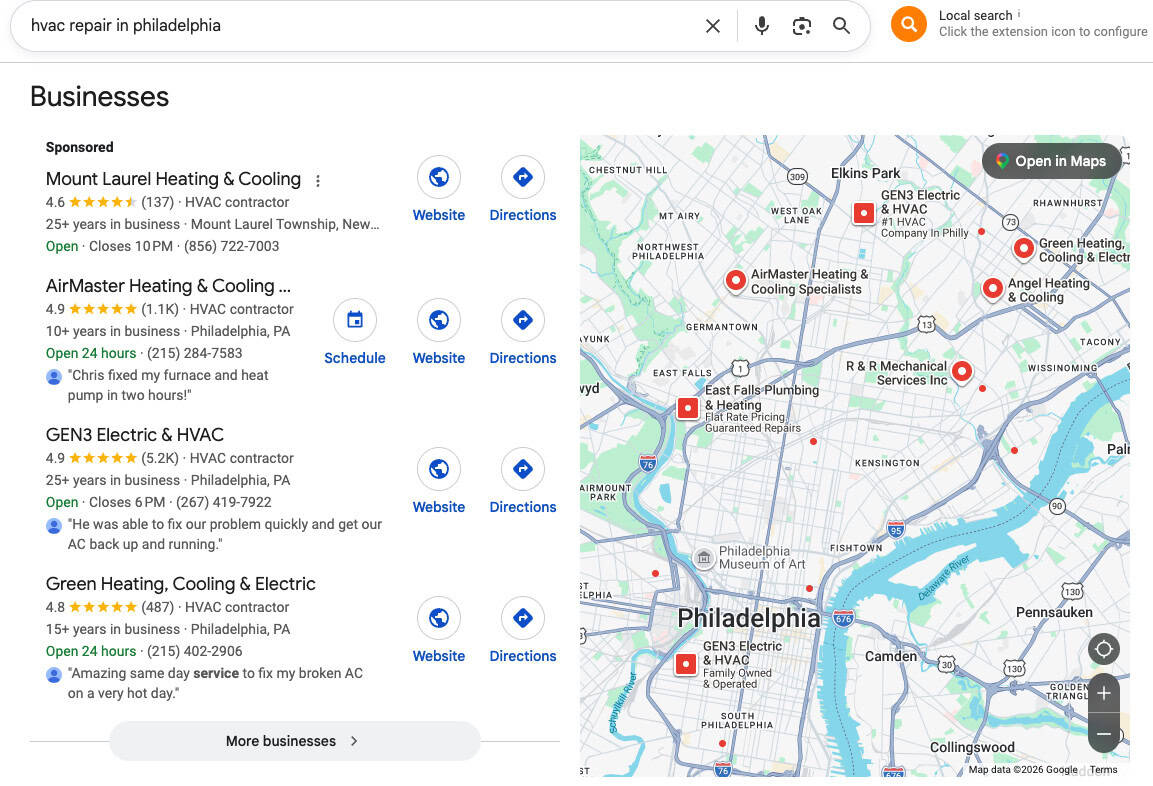
Those local searches show up in two places on Google:
- The map pack, the block of Business Profiles with a map near the top of the search results, drawn from the same listings people see in Google Maps. Google says these local results are mainly based on relevance, distance and prominence.
- The regular organic results below it, which come from your website.
Good local keyword research feeds both, and that’s where local visibility comes from. Your website pages target the terms, and your Google Business Profile matches the same terms through its categories, services and description.
Types Of Local Keywords
Local keywords come in three kinds, and you want all three on your list:
| Type | What it looks like | Example (plumber) |
|---|---|---|
| Explicit | The location is typed in the search | "plumber philadelphia," "drain cleaning south philly" |
| Implicit | No location typed, but Google treats it as local | "emergency plumber," "water heater repair," "plumber near me" |
| Question | A question with a local job behind it | "how much does it cost to replace a water heater in philadelphia" |
Implicit keywords are the ones people miss. Someone in Manayunk who types “emergency plumber” gets local results even though they never named a place. That’s why the map pack matters so much for local intent keywords.
The Example: One Plumber, One City
To keep this practical, we’ll work one example all the way through.
The business: a family-run plumbing company based in Northeast Philadelphia that serves the whole city and a few close suburbs. It does repairs, water heaters, drains and sewer lines. It has a website with a homepage, one services page and a contact page, and a Google Business Profile.
This is an illustration we built for the post, not a BCC client, and every search term below is an example of the kind of thing you’ll find, not a measured number. If you run a different kind of local business, swap in your own jobs and your own neighborhoods. The steps don’t change. (If you’re in the trades, our guide to SEO for home services goes deeper on the rest of the plan.)
Step 1: Build Your Seed List From How Customers Describe The Job
A seed keyword is the plain-English name for something you do, with no location attached. “Drain cleaning.” “Water heater repair.” “Sewer line replacement.”
Don’t build this list from your own service menu. Build it from your local customers.
The plumber checks four places:
- Call notes and booking forms. What did people say the problem was, in their words?
- Emails and texts. “My toilet won’t stop running.” “No hot water since this morning.”
- Google reviews. Customers repeat the job they hired you for: “fixed our burst pipe,” “replaced our sewer line.”
- Invoices. Which jobs bring in the most revenue? Those seeds go to the top of the list.
From that, the plumber’s seed list looks something like this:
- Job names: drain cleaning, water heater repair, water heater replacement, tankless water heater installation, sewer line repair, leak detection, sump pump installation, emergency plumber
- Problem phrases: no hot water, clogged drain, burst pipe, toilet keeps running, sewer backup, water heater leaking
The problem phrases matter. A lot of people don’t know they need “leak detection.” They know there’s a wet spot on the ceiling.
The Keyword List Already Sitting In Your Inbox
- Open your last 20 customer emails, texts or booking-form messages.
- Highlight the exact words each person used to describe the problem.
- Add every phrase that shows up twice to your seed list, unpolished, exactly as they wrote it.
Customers don't talk like keyword tools. Their phrasing is often the long-tail keyword no tool would suggest, and it costs nothing to collect.
Step 2: Add City And Neighborhood Modifiers
A modifier is the location part of the keyword. Write down every way a customer would name the area you serve:
- The city, both ways: Philadelphia, Philly
- Neighborhoods you actually work in: Fishtown, South Philly, Manayunk, Roxborough, Northern Liberties, Northeast Philly
- Nearby towns you serve: for this plumber, a few close suburbs in Montgomery and Delaware counties
- Your county or region, if people use it: “Delaware County,” “Main Line”
Then combine seeds and modifiers: “water heater repair philadelphia,” “drain cleaning south philly,” “plumber fishtown.”
Only add a neighborhood or town if you really serve it and could write something specific about it. A modifier list is a list of promises. If you can’t take the job in that area, don’t target it.
How To Handle "Near Me" Searches
“Near me” keywords like “plumber near me” show up on almost every local keyword list. You still don’t need to stuff “near me” into your pages.
Google’s Business Profile help says distance is “how far each business is from the customer who’s searching,” and if a customer doesn’t share where they are, Google uses what it knows about their location. The searcher’s location does the work. Your job is to be relevant to “plumber” and close enough to that person.
The plumber handles them three ways:
- Track “near me” terms as a demand signal. In Keyword Planner, set the location to Philadelphia and look at “plumber near me” next to “plumber philadelphia.” It tells you how much local demand exists.
- Map them to the same page as the plain term. “Water heater repair near me” belongs to the water heater repair page and the Business Profile, not to a new “near me” page.
- Don’t add it to your business name. Google’s guidelines say “including unnecessary information in your business name isn’t permitted.” “Philly Plumbing Near Me” is a suspension risk, not a strategy.
Step 3: Check Demand With Free Tools
Now you have a list of combinations. The next question is which local keywords people actually search, and roughly how much search volume each one gets. Four free tools answer it.
| Tool | What it tells you | What to watch for |
|---|---|---|
| Google Keyword Planner | Average monthly searches for a keyword in a location you pick, plus new keyword ideas | Volumes are rounded, often shown as ranges, and you need a Google Ads account with billing set up |
| Google autocomplete and People Also Ask | The phrasings and questions real people type, influenced by location | No numbers, just proof the search exists |
| Google Business Profile performance | The search terms people used when your profile showed up | Only covers searches you already appear for |
| Google Search Console | The queries that already show your website, with clicks, impressions and position | Only works for a site that already gets impressions |
Google Keyword Planner
Keyword Planner lives inside Google Ads. It’s free to use, but Google’s help says you have to finish account setup, including billing information, to get keyword ideas. You don’t have to run a campaign.
For the plumber:
- Open Keyword Planner and choose “Discover new keywords.”
- Enter five or six seeds: water heater repair, drain cleaning, sewer line repair, emergency plumber, plumber.
- Set the location. Google lets you target countries, territories, regions and cities, so pick Philadelphia instead of the whole United States.
- Look at “average monthly searches” and the keyword ideas Google adds.
Google defines average monthly searches as the average for a keyword and its close variants, based on your date range, location and network settings. Its help also says the numbers are rounded. And if your account doesn’t spend much on ads, you’ll often see a range like “100 to 1K” instead of one number, a limit Google confirmed to Search Engine Land back in 2016.
So don’t treat any number as exact. Use the ranges to sort keywords into tiers: the terms in your top range are your main targets, the next range down are supporting terms, and anything that shows no volume at all goes to the FAQ pile or gets cut.
Google Autocomplete And People Also Ask
Type “water heater repair” into Google and stop before you hit enter. The suggestions are autocomplete. Google says these predictions “reflect real searches that have been done on Google,” and that they weigh the language of the query, the location it comes from, trending interest and your own past searches.
Use that. Type each seed with and without your city and write down what comes up. Then search the term and open the People Also Ask box. Those questions (“how long does a water heater last,” “is it worth repairing a 10 year old water heater”) are your FAQ list.
Your own search history shapes what you see. Run these checks in a private window so the results aren’t tilted toward what you’ve searched before.
Your Google Business Profile Search Terms
If you have a Business Profile, open the Performance view and look at Searches. Google describes it as “the search terms people used to find your business.” It updates at the start of each month and can take up to five days to appear.
For the plumber, it might show “plumber,” “plumbers near me,” “emergency plumber” and the business name. Any job-specific term there means Google already connects the profile to that service.
It has two limits. It only shows searches where your profile already appeared, and Google says the data covers both organic results and Google Ads.
Google Search Console For An Existing Site
If your site already gets traffic, Search Console shows the queries that led to it in the Performance report. Filter by a page (say, the services page) and you’ll see which local terms it already shows up for and at what average position.
Look for terms where you get impressions but sit on page two or three. Those are your quickest wins: Google already associates your page with the search, and a dedicated page or a better section can move it.
Google notes that some queries are left out of the report to protect privacy, so the list is never complete. Treat it as a floor.
Google Trends For Seasonal Demand
Google Trends shows how interest in a search term rises and falls over time, by region. For the plumber, comparing “water heater repair” and “sump pump” across a year shows when each one peaks, which tells you when to have those pages and Business Profile posts ready. It shows relative interest, not search counts, so use it for timing and pair it with Keyword Planner for volume.
When A Paid Tool Is Worth It
Free tools get you a working list. Paid keyword research tools like Semrush, Ahrefs or Moz add keyword difficulty scores, competitor keyword lists and local rank tracking across a grid of locations. They help when you’re competing in a crowded market or managing several locations. Most small businesses with one location can build the first list without them. We compare the options in our roundup of local SEO tools.
Step 4: Group Keywords By Search Intent
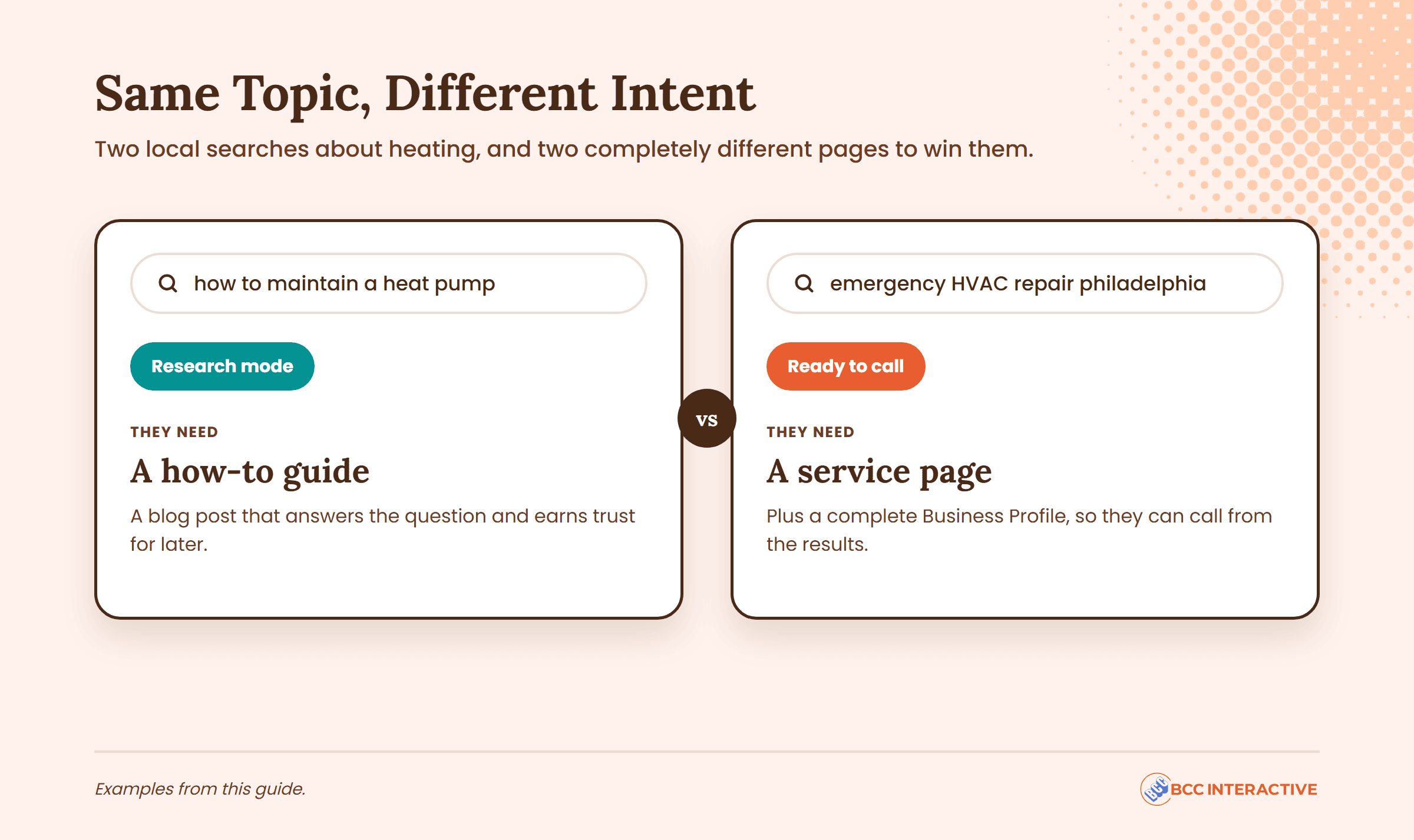
Search intent is what the person wants to happen after they search. It decides what kind of page can rank.
For a local service business, most searches fall into three buckets:
- Call now. “Emergency plumber philadelphia,” “burst pipe repair.” They want a phone number, fast.
- Hire soon. “Water heater replacement philadelphia,” “tankless water heater installation.” They’re comparing companies and want proof, pricing signals and reviews.
- Still researching. “How much does a sewer line replacement cost,” “why does my water heater make noise.” They want an answer before they pick anyone.

Before you write a word, pull up the results page for your top keyword and look at what's ranking. Blog posts? Service pages? Business Profiles? Google is telling you what it thinks that searcher wants. Build the wrong kind of page and you're working against yourself before you start.
Step 5: Map Each Keyword Group To A Page
Every keyword group gets one home, and no two pages chase the same group. The plumber’s finished map looks like this:
| Keyword group | Example searches | Intent | Where it goes |
|---|---|---|---|
| Core service, city level | plumber philadelphia, plumber near me, plumbers in philly | Call now / hire soon | Homepage and the Business Profile's primary category (Plumber) |
| Emergency | emergency plumber philadelphia, 24 hour plumber, burst pipe repair | Call now | Emergency plumbing service page with the phone number at the top; Business Profile hours and description |
| Water heaters | water heater repair philadelphia, no hot water, tankless water heater installation | Hire soon | Water heater service page; listed as a service on the Business Profile |
| Drains and sewer | drain cleaning philadelphia, sewer line repair, sewer backup | Hire soon | Drain and sewer service page; listed as a service on the Business Profile |
| Neighborhoods | plumber fishtown, plumber south philly, plumber manayunk | Hire soon | Location pages only where the business can show real local work (jobs done there, local reviews); otherwise covered by the city-level pages |
| Cost and how-to questions | how much does water heater replacement cost in philadelphia, how long does a water heater last | Researching | FAQ sections on the matching service page, or a blog post if the question needs a full answer |
<!– GRAPHIC: the keyword map above as a visual flow, seed list on the left branching into the six groups, each ending at its page type (service page, location page, Business Profile, FAQ). 1200×713 inline template. –>
A few rules behind that map:
- One primary category. The Business Profile’s primary category matters most for map pack terms. Whitespark’s 2026 guide calls it “the #1 most important local search ranking factor” and says to pick the one that most closely matches the term you want to rank for. Google’s own guidelines say to “choose the fewest number of categories” that describe your core business. Our Google Business Profile checklist walks through the rest of the profile.
- Service pages before location pages. The plumber gets more from one strong water heater page than from ten thin neighborhood pages with the city name swapped out.
- Location pages earn their place. A Fishtown page makes sense if it shows jobs done in Fishtown, reviews from Fishtown customers and details specific to that neighborhood. If you serve multiple locations with separate offices, each office gets its own page and its own profile.
- Questions go where the buyer already is. An FAQ on the water heater page catches “how long does a water heater last” and keeps that reader one click from booking.
Then optimize each page. Put the keyword where it counts: the title tag, the H1, the first paragraph, and naturally in the body. Write for the person with the wet basement, not for a keyword density score.
Turn This Research Into A Checklist
Keyword research is step one. The Local SEO Checklist covers the other nine, from your Business Profile to reviews to citations, as a PDF you can work through for your own business.
Download the Local SEO ChecklistStep 6: Check Who You're Up Against
Before you commit to a keyword group, look at who already ranks for it.
Search each main keyword from a private window (or ask someone who lives in the area to search it on their phone, since location changes the map pack). Note:
- Who’s in the map pack, how many reviews they have and which primary category they use
- Which websites rank below it, and whether they’re local companies or national directories
- What kind of page ranks: service pages, location pages, or directory listings
If the map pack is full of profiles with hundreds of reviews, your website may be the faster path for now. If the organic results are all directories, a strong service page from a real local company can stand out.
Long-tail local keywords help here. “Tankless water heater installation philadelphia” has fewer searches than “plumber philadelphia,” but fewer companies compete for it, and the person searching knows exactly what they want.
"Working with Cory and his team has been incredible. Higher search rankings, more leads, and most importantly, more patients."
Step 7: Track What Moves And Refresh The List
Local keyword research isn’t one-and-done. Check these on the same day every month:
- Search Console queries for each service and location page: are the target terms gaining impressions and moving up?
- Business Profile search terms: are new job-specific terms showing up?
- Calls, direction requests and form fills, so you know which keywords bring customers and not just visits
- The map pack for your top terms, searched from the neighborhoods you care about
How fast things move depends on where you start. An established site with clear gaps in its targeting can see movement in roughly 60 to 90 days. A competitive market or a site that needs bigger fixes is more often 3 to 6 months. A brand-new site can take 6 to 12 months or more.
Refresh the seed list every quarter or so. New services, new neighborhoods and new customer phrasing all mean new keywords.
Your Keyword Map Is Your Site Plan
The point of local keyword research isn’t a spreadsheet. It’s knowing which pages your site needs and what your Business Profile should say, in your customers’ words. The process works the same for a plumber in Philly, a dentist in Austin or a dispensary in Chicago.
If you’d rather have someone build that map with you, that’s what our local SEO work starts with.
Frequently Asked Questions
Build a seed list from how your customers describe the job, add the city, neighborhood and town names you really serve, then check demand in Google Keyword Planner with the location set to your city. Add phrasings from autocomplete, People Also Ask, your Business Profile search terms and Search Console. Group the keywords by intent and assign each group to one page.
They’re searches where Google assumes the person wants a business nearby, even if no location is typed. “Emergency plumber” and “dentist open saturday” are local intent keywords. You can spot them by searching the term: if a map pack shows up, Google treats it as local.
Use Google Keyword Planner and set the location to your city or region instead of the whole country. Google says the volumes are rounded and specific to the location you pick, and accounts with little ad spend often see ranges. Use them to compare keywords against each other, not as exact counts.
Usually not. Google says that when someone doesn’t share a location, it uses what it knows about where they are. Focus on being relevant for the service and clear about where you work. Don’t add “near me” to your Business Profile name, which Google’s guidelines don’t allow.
Run the same process once per location, with that location’s city and neighborhood modifiers, and set Keyword Planner to each area separately. Each office then gets its own location page and its own Business Profile, built around the terms for that area. Our guide to local SEO for multiple locations covers the setup.
Your Competitors Already Show Up In Local Search. Do You?
- Which local keywords your business can win now, and which ones to leave for later
- Where your leads are leaking between the map pack, your pages and your Business Profile
- A 90-day local SEO plan you can run with or without us
