


Google doesn’t rank the best plumber in town. It ranks the plumber whose profile, reviews and website give it the most reasons to.
That’s the whole game for a small business with one location and nobody on staff doing marketing. You don’t need to outspend the franchise across town. You need to out-organize them on the handful of things Google actually checks.
Most local SEO tips lists are written for agencies. This one is the effective local SEO strategies for a one-location business, in the order to do them, with the time each takes and what each gets you. If you want the definition first, what local SEO is covers it in five minutes. If you want every tactic we know, the full local SEO strategy guide has them. This is the owner’s version.
Key Takeaways
Google judges three things. Its help page says local ranking comes down to relevance, distance and prominence, and that there's no way to pay for a better spot.
Your profile is the biggest lever. Whitespark's survey of 47 local search experts ranks your primary Google Business Profile category as the number one local ranking factor.
Reviews decide who gets the call. BrightLocal's survey of 1,002 US consumers found 97% read reviews and 80% prefer a business that replies to all of them.
Most of this is free. Google Business Profile, Search Console and the profile's performance report cost nothing, so your local SEO strategy mostly costs time.
Profile changes show in days, website changes in months. Google says profile edits usually review in about 10 minutes but can take 30 days, and a known page gets recrawled about every 30 days.
Track calls and direction requests, not just rankings. The performance report inside your profile shows the actions that turn into customers.
What Local SEO Means When You Have One Location
Local SEO (local search engine optimization) is the work that gets your business shown in local searches, when someone nearby looks for the products or services you sell. Two places in the local search results matter: the map with three businesses at the top, called the local 3-pack, and the regular links under it.
Local SEO for small businesses is narrower than SEO. You’re not trying to rank nationally for “plumber.” You’re trying to be one of the three businesses Google shows a person three miles away who typed “plumber near me” at 9pm on a Tuesday. That’s a smaller fight, and it’s winnable without a marketing team.
Google Ranks the Best-Optimized Business, Not the Best Business
Google says local ranking comes down to relevance (how well your profile matches the search), distance (how far you are from the searcher) and prominence (how well known you are, counting reviews, links and mentions across the web). The same help page says there’s no way to request or pay for a better local ranking.
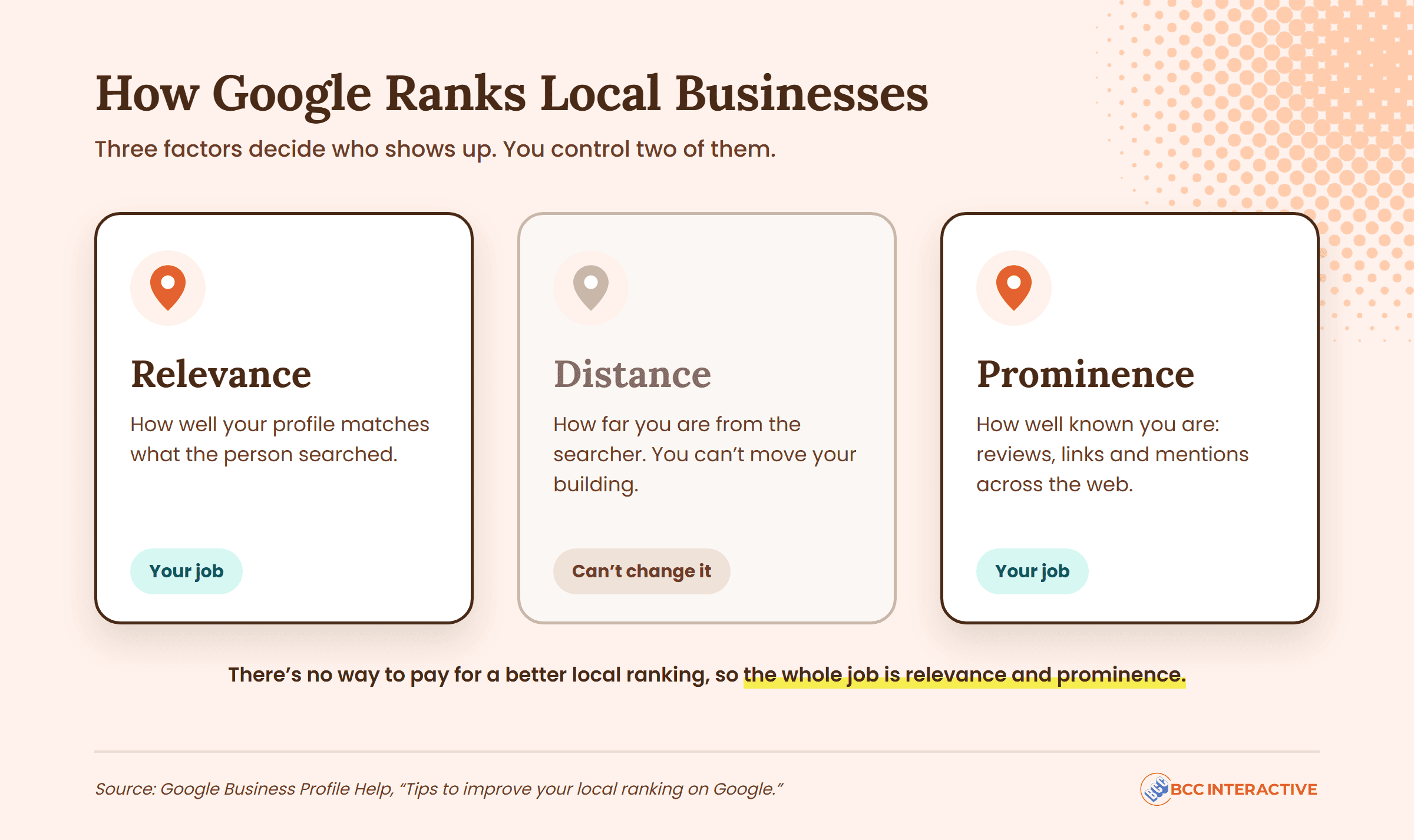
You can’t move your building. So the whole job is relevance and prominence.
And Google can’t visit your shop. It only reads what’s online about you. A mediocre competitor with a complete business listing, 120 reviews and a page for every service will outrank a better business with a half-finished profile and nine reviews. Every time.
Whitespark’s 2026 Local Search Ranking Factors survey of 47 local search experts ranks your primary Google Business Profile category as the biggest local pack factor. Distance is second. Keywords in your business name are third. Your star rating and your number of text reviews are in the top ten. Your website is further down the list. Which tells you where to start.
The 11 Strategies, With Time and Payoff
| # | Strategy | Time to do it | Cost | What it gets you |
|---|---|---|---|---|
| 1 | Claim, verify and complete your Google Business Profile | 2 to 3 hours, plus the verification wait | Free | Eligibility for the map pack at all |
| 2 | Get your primary category right | 30 minutes | Free | The biggest single ranking lever |
| 3 | Match your name, address and phone number everywhere | 2 to 4 hours, once | Free | Google trusts your listing data |
| 4 | Ask for a review every week and reply to all of them | 15 minutes a week | Free | Rankings, and the click |
| 5 | Find the local keywords customers actually type | 2 hours | Free | Know which services and towns to target |
| 6 | Put your city on your homepage and service pages | A day, or a freelancer for a day | Free to low | Rankings in the regular results |
| 7 | Make your site work on a phone | 1 hour to check, varies to fix | Free to moderate | Google indexes your mobile site |
| 8 | Get listed where it counts and skip the rest | 3 hours, once | Free to low | Prominence, and consistent data |
| 9 | Earn a few local links | 1 to 2 hours a month | Usually a sponsorship fee | Prominence competitors can't copy fast |
| 10 | Publish local content only when it answers a real question | 3 hours per page | Free | Rankings for questions people actually ask |
| 11 | Track calls, directions and rankings every month | 30 minutes a month | Free | Proof it's working, and what to fix next |
<!– GRAPHIC: a 90-day timeline for a one-location business: four blocks (Week 1 profile and category, Weeks 2 to 4 profile complete and NAP fixed, Weeks 5 to 8 website pages, Weeks 9 to 12 directories, links and first question page), with the ongoing monthly loop (reviews, photos, one page, one link ask, 30-minute check) as a repeating strip underneath. Source line: BCC Interactive. –>
1. Claim, Verify and Complete Your Google Business Profile
Your Google Business Profile (GBP, which Google used to call Google My Business) is the free listing that powers the map pack, Google Maps and the business box beside the search results. If you only do one thing to improve your local SEO, do this one.
Claim it at business.google.com, then verify it. Google recommends video verification where it’s offered and says verification reviews take up to 5 business days. Until you verify you can’t edit your business information or reply to customers, so start here and work on the rest while you wait.
Then fill in every field: your business name exactly as it appears on your sign, your address (or your service area if you go to customers), phone number, website, business hours including holidays, each service with a short description, and photos of the outside, the inside, your team and your work.
Google’s ranking help page lists complete information, verification, accurate hours, replying to reviews and adding photos as the ways to improve local ranking. That’s the official list, and the profile covers all of it. Our Google Business Profile setup guide walks through each field, and the GBP checklist is the same work as a tick list.
2. Get Your Primary Category Right
Your profile has one primary category and up to nine more. The primary one is the strongest ranking signal you control, per Whitespark’s 2026 survey, and “incorrect primary category” is the second most damaging mistake on the same survey’s list of negative factors.
Pick the category that describes what you most want to be found for, not the broadest one. A family law practice is “Family law attorney,” not “Lawyer.” Add secondary categories for your other services, but Google’s guidelines say to use only categories that represent your business.
Then check what your top three map-pack competitors use. Search your main service, open each listing, and the primary category sits under the business name. If all three use the same one and you don’t, that’s your first fix.
A word on names. Whitespark’s experts rank keywords in the business name as the third strongest factor, and you’ll see competitors listed as “Mike’s Plumbing and Drain Cleaning Philadelphia.” Google’s guidelines say your name must match the one on your storefront, with no added services, locations or taglines, and that adding them can get a profile suspended. Don’t do it. Suggest an edit on the competitor who does.
3. Match Your Name, Address and Phone Number Everywhere
NAP is name, address and phone number. Google matches your profile against your website, Yelp, Facebook, Apple Maps and the local listings that mention you, and uses the matches to confirm you’re real and where you are.
Pick one version of each and use it everywhere: “Suite 200” or “Ste 200,” “(215)” or “215-,” the same phone number on every listing.
Then audit. Search your business name plus your phone number, and your name plus your old address if you’ve moved. Fix what you find, starting with Google, your website, Apple Maps, Bing Places, Yelp and Facebook. If you have more than one location, each needs its own profile and its own page, and local SEO for multiple locations covers that.
4. Ask for a Review Every Week and Reply to All of Them
Reviews do two jobs. They’re a ranking signal (Whitespark’s experts put your rating and your number of text reviews in the top ten), and they’re what the searcher reads before deciding who to call.
BrightLocal’s 2026 Local Consumer Review Survey of 1,002 US adults found:
- 97% read online reviews for local businesses, and 41% always do, up from 29% a year earlier
- 31% will only use a business rated 4.5 stars or higher, up from 17%
- 74% want reviews written in the last three months
- 80% are more likely to use a business that replies to all its reviews, but generic, copy-paste replies put off 50%
So recency matters as much as volume, and the reply matters as much as the review. That’s how reviews attract more local customers, not just rankings.
The system that works for a one-person operation: every time you finish a job, send one text with your review link, from the person they just dealt with.
Two rules from Google’s review policy. You can’t offer money, discounts or gifts for a review, and you can’t ask only the happy customers (Google calls that selectively soliciting positive reviews). Ask everyone, the same way. Then reply to every review within a few days, by name, mentioning the job. Four sentences, written by you.
The Text That Gets Reviews Without Begging
It names the job, says how long it takes and gives them an out. Send it within an hour of finishing. Your link is under "Ask for reviews" in your Business Profile.
5. Find the Local Keywords Customers Actually Type
Before you touch your website, find out what local customers actually type. Not what you call your services. What they call them.
Start free. Your Business Profile’s performance report shows the search terms people used to find your listing. Google Search Console shows the searches that already show your website. Google’s autocomplete and the “People also ask” box show the variations.
You’re building three lists:
- Your services, in the customer’s words (“AC repair,” not “HVAC solutions”)
- The towns and neighborhoods you serve, by name
- The questions people ask before they hire (“how much does it cost to replace a water heater”)
Each service plus each main town is a page you may need. Each question is a page you might write later. Our guide to local keyword research goes deeper.
6. Put Your City on Your Homepage and Service Pages
Your website’s job is to tell Google two things clearly: what you do, and where you do it. That’s what earns local search rankings in the regular results. Most small business sites fail the second part. The homepage says “Quality plumbing you can trust” and never names a town.
Fix it page by page:
- Homepage title tag: your main service plus your city, then your name. “Plumber in Doylestown, PA | Keller Plumbing.”
- Homepage H1: the same idea in plain words.
- One page per main service: the service and the city in the title, the H1 and the first paragraph, then how you do the job, what it costs and how to book.
- A contact page with your NAP written as text (not an image), your hours and an embedded Google Map.
- Photos of real jobs, with the town in the file name and the alt text.
Keep it honest. One page per service you actually sell, for the area you actually serve. Ten thin pages for ten towns you’ve never worked in is what Google’s spam policies call doorway abuse, and it doesn’t work anyway.
7. Make Your Site Work on a Phone
Google uses the mobile version of your site for indexing and ranking. That’s its own wording, from its mobile-first indexing documentation.
Open your site on your own phone, on cellular, and check five things:
- Does it load in a few seconds?
- Can you tap the phone number and have it dial?
- Does the address open a map when you tap it?
- Can you read the text without zooming?
- Does the contact form work with a thumb?
If any of those fail, that’s your next web project, ahead of a redesign.
"As pure ROI goes, his performance and still ongoing SEO strategies, is the best marketing investment I've made for my business."
8. Get Listed Where It Counts and Skip the Rest
Citations are mentions of your name, address and phone number in local business directories and other websites. Whitespark’s survey has them sliding in importance for several editions in a row. So do them once, do them right, and stop.
The ones worth your time:
- Apple Maps (through Apple Business), Bing Places, Yelp and Facebook
- The two or three directories your industry actually uses (Avvo for lawyers, Healthgrades for doctors, Houzz for contractors)
- Your chamber of commerce and any trade association you belong to
- The Better Business Bureau, if you’re already accredited
Same name, address and phone on every one. Then leave them alone.

Skip the "we'll submit you to 300 directories" offers. Most of those sites send nobody, and some you can never edit again. Do the dozen that matter by hand, and if a vendor says citations are the reason you're not ranking, ask what else they checked first.
9. Earn a Few Local Links
A link is another website pointing to yours. Google reads links as a sign that you’re known, which feeds prominence. Local links, from sites in your area, are the ones a small business can actually get:
- Sponsor local events: a youth team, a 5K, a school fundraiser. Most list their sponsors with a link.
- Join the chamber of commerce. The member directory usually links.
- Give a real quote to the local paper or a neighborhood blog when they cover your industry.
- Ask the publisher of a local “best of” list to include you, with your reviews as the case.
Five to ten of these over a year is a real advantage in your local market, because the franchise across town won’t bother. Never buy links. Google’s spam policies count buying or selling links for ranking purposes as link spam.
10. Publish Local Content Only When It Answers a Real Question
You don’t need a blog. You need pages that answer the questions from strategy 5.
“How much does a furnace replacement cost in Bucks County?” is a page. “Do I need a permit to replace a water heater in Philadelphia?” is a page. “Our top 10 tips for winter” is not, unless your customers are typing that.
One page a month, written by the person who answers that question on the phone every week, beats ten generic posts from a content mill, and it earns the local links from strategy 9. Whitespark’s report notes that local search has stayed somewhat insulated from the traffic losses AI Overviews have caused general information sites, so the question pages still get found.
11. Track Calls, Directions and Rankings Every Month
You can’t fix what you don’t measure. Three free sources, 30 minutes a month:
- Your Business Profile performance report: calls, direction requests, website clicks, messages and the search terms that showed your listing. This is the number that matters. A map-pack spot that produces no calls is a vanity number.
- Google Search Console: which searches show your website, where it ranks and which pages get clicks.
- A manual rank check: search your top three services from your phone, from your shop, in a private browser window, and note who’s in the 3-pack.
Write the numbers down once a month. Three months of them tells you whether your SEO efforts are landing; one month tells you nothing. When you want a paid tool that tracks rankings across your zip codes, the local SEO tools post covers what’s worth paying for.
Want All Eleven Strategies as a Checklist?
Every strategy in this guide, in order, on one printable page you can work through for your own business. No email required.
Download the Local SEO ChecklistHow Much Time and Money Local SEO Takes for a Small Business
The setup work (strategies 1, 2, 3, 5, 6 and 8) is roughly 15 to 25 hours, spread over your first month or two. The ongoing work (4, 9, 10 and 11) is about two to four hours a month.
The money, if you do it yourself: the Google tools are free, website edits cost a freelancer’s day or two if you can’t make them, sponsorships cost whatever the youth league asks, and rank tracking tools are optional until month three. That’s the honest budget for a one-location business. Your main cost is your Tuesday nights.
Would you rather pay someone to do it? Our guide to affordable SEO services for small businesses covers what each budget buys.
Your monthly 30 minutes: reply to every review, add five photos to your profile, check calls and directions in the performance report, search your top three services from your phone, note what changed.
- Reviews
- Photos
- Performance
- Rank check
What Order to Do It In: Your First 90 Days
| When | Do this | Why this order |
|---|---|---|
| Week 1 | Claim and verify your profile, fix the primary category, send your first review text | Verification has a wait, and the category is the biggest lever |
| Weeks 2 to 3 | Complete every profile field, add 20 photos, fix your NAP on Google, your site, Apple, Bing, Yelp and Facebook | Profile changes review fastest |
| Weeks 3 to 4 | Build your keyword list from the performance report and Search Console | You need the words before the website work |
| Weeks 5 to 8 | Homepage title and H1, one page per main service, contact page with a map, the phone check | Website changes take longest to show, so start them early |
| Weeks 9 to 12 | Industry directories and chamber listing, first sponsorship ask, first question page | Prominence work compounds from here |
| Every month after | Reviews, photos, one question page, one link ask, the 30-minute check | The ongoing part |
How Long Before Local SEO Shows Results
There’s no one answer, and anyone who gives you one is guessing.
Profile changes are the fast part. Google says edits usually review in about 10 minutes but can take up to 30 days. Website changes wait on a recrawl, which Google analyst Gary Illyes put at about 30 days for a known page at Search Central Live in October 2026 (reported by Search Engine Roundtable).
Beyond that, it depends on where you start:
- An established business with a half-finished profile and no service pages often ranks higher in local searches within 60 to 90 days once the basics are done, because the gap was the problem.
- A business in a crowded category (injury lawyers, dentists, HVAC in a big metro) where competitors already do all eleven: expect 3 to 6 months of steady work before you’re a regular in the 3-pack.
- A brand-new business with a new profile and a new site is usually 6 to 12 months or more, because prominence is the one factor you can’t rush.
Our post on how long SEO takes goes through the starting points in detail.
When to Hire Help, and What to Ask For
Hire when the setup is done and the ongoing part isn’t getting done. If strategy 4 has slipped for two months straight, that’s the signal.
What to look for in local SEO services: they start by auditing your profile and your competitors’ categories, they talk about calls and direction requests rather than “visibility in local search,” and they can tell you which of the eleven they’ll do and which stay with you (reviews always stay with you, because nobody can text your customers for you). We scope local work as custom solutions around your goals, because a solo attorney and a three-truck plumbing company don’t need the same eleven things done to the same depth.
Of the other marketing strategies, pay-per-click ads are the usual comparison: a spot at the top the minute you pay, gone the minute you stop. Most small businesses end up doing some of both. If the jargon is the obstacle, the SEO glossary defines the terms in plain English.
Start With Your Profile This Week
The business that shows up gets the call. Not the best one. The one Google has the most information about.
Local SEO helps a one-location business be that one within a quarter, with free tools. Verify the profile, fix the category, send the first review text. Everything else builds on those three.
Frequently Asked Questions
It’s the work that gets a business shown in local searches, in the map pack and the regular results. For one location it comes down to a complete, verified Google Business Profile with the right primary category, steady reviews, consistent name-address-phone data, and a website that names your services and your city.
Yes. It’s the one channel where a single location can beat a bigger competitor on organization rather than budget, and the core tools are free. The cost is mostly 15 to 25 hours of setup and a few hours a month after that.
Done yourself, the tools are free and the costs are small: a freelancer’s day for website edits if you can’t make them, and a sponsorship fee or two for local links. If you hire an agency, pricing should be a custom plan scoped to your goals and your local market, naming which of the eleven strategies the agency does and which stay with you.
Yes. Every strategy here is built for an owner with no marketing team, and the setup is roughly 15 to 25 hours over the first month or two. The part people drop is the ongoing work, especially asking for reviews every week, and that’s the point to get help.
Whitespark’s 2026 survey of 47 experts ranks the primary Google Business Profile category first, proximity to the searcher second and keywords in the business name third. Google itself describes ranking as relevance, distance and prominence. The category and your reviews are the ones you control most directly.
It depends on where you start. Profile edits usually review in about 10 minutes but can take up to 30 days, and website changes wait on a recrawl of roughly 30 days. An established business with gaps often sees map-pack movement in 60 to 90 days; a crowded category takes 3 to 6 months; a brand-new business and site usually needs 6 to 12 months or more.
Want Someone to Tell You Which of the Eleven You're Missing?
- Which of the eleven strategies your business already wins and which are costing you calls
- Where your leads are leaking, from the map pack to your contact form
- A 90-day local plan you can run with or without us
