


Slow-loading websites are a serious problem in today’s digital world. Website speed directly impacts how people experience your business, and a few extra seconds of load time can be the difference between a sale and a lost customer.
Think about your own experience browsing the web. How long will you wait for a page to load? Three seconds? Maybe two? Most people don’t even get to three. If your site isn’t loading quickly, visitors are already gone, probably to a competitor.
We’re living in an on-demand world where immediacy isn’t a nice-to-have. It’s the expectation. Your website is often the first interaction someone has with your business. If it crawls, that’s the impression you leave.
Key Takeaways
Three seconds is the limit. Google found that 53% of mobile visits are abandoned when a page takes longer than 3 seconds to load.
Most sites miss it. The average page loads in 2.5 seconds on desktop and 8.6 seconds on mobile, while the average first-page Google result loads in 1.65 seconds.
Slow pages cost sales. Nearly 70% of consumers say page speed affects whether they'll buy from an online retailer, and each second of delay can cut conversions by an estimated 7%.
Speed is a ranking factor. Only 53% of websites have a good Core Web Vitals score on desktop and 41% on mobile, so a fast site is a real advantage over competitors.
Paid ads suffer too. Every dollar spent sending traffic to a site that takes 6 seconds to load is funding a bad first impression.
Images are the biggest win. Images typically make up 50 to 70% of total page weight, so compression and lazy loading come before anything else.
Test before you fix. Google PageSpeed Insights is free and gives you a mobile and desktop score with specific fixes, so start there and retest after every change.

How Do You Know If You Have A Website Speed Problem?
Web performance data gives us a clear picture of what “fast enough” actually means. About 47% of consumers expect a web page to load in two seconds or less.
According to Google, 53% of mobile site visits are abandoned if pages take longer than 3 seconds to load. And while that 3-second benchmark has been the standard for years, the bar keeps rising: the average first-page Google result now loads in 1.65 seconds. Meanwhile, the average page load time is 2.5 seconds on desktop and a much slower 8.6 seconds on mobile, so most sites are falling well short of where they need to be.
What that tells you: if your website takes more than 3 seconds to load on a phone or desktop, you’re potentially losing more than half your visitors before they read a single word. That’s not a content problem. That’s a speed problem.
Run your site through Google PageSpeed Insights before you read another word. It's free, it scores mobile and desktop separately, and the fix list comes from the company that ranks your site.
- Mobile score
- Desktop score
- Fix list
Why Speed Matters For User Experience
When someone visits your website for the first time, and the page just sits there loading, they’re already forming an opinion about your business, and it’s not a good one. A slow website signals that something is off, whether that’s outdated tech, a lack of investment, or just not caring enough to maintain the site.
The numbers back this up. Nearly 70% of consumers say page speed impacts their willingness to buy from an online retailer. And 79% of shoppers who are dissatisfied with site performance say they’re less likely to purchase from the same site again. That’s not just a lost sale. That’s a lost customer.
Speed matters for user experience in three concrete ways:
- Patience is shorter than ever. We live in an on-demand world. People expect things immediately, online and offline. Each second of delay in page load time can reduce conversions by an estimated 7%.
- A bad experience sticks. Customers remember slow, frustrating visits. They leave, and they don’t come back.
- They go straight to a competitor. 53% of users who abandon a slow site report immediately visiting a competitor’s site.
A good user experience starts before anyone reads your content. Getting your site to load quickly is the foundation of everything else.
Why Page Speed Is Important For SEO
The reasons website speed is important go well beyond user experience, and they matter most to anyone investing in organic growth.
Search engines use page speed as a ranking factor. Google wants to send users to websites that deliver good experiences. A slow-loading website signals a poor experience, and search engines penalize it accordingly. You can have excellent content and well-written title tags, but if your site performance is lagging, you’re losing ground in search engine rankings to faster competitors.
Speed also affects crawl efficiency. Search engines allocate a crawl budget to every site. If your pages are slow, Google’s crawlers spend more time waiting and less time indexing. Fewer indexed pages mean less content in front of potential customers.
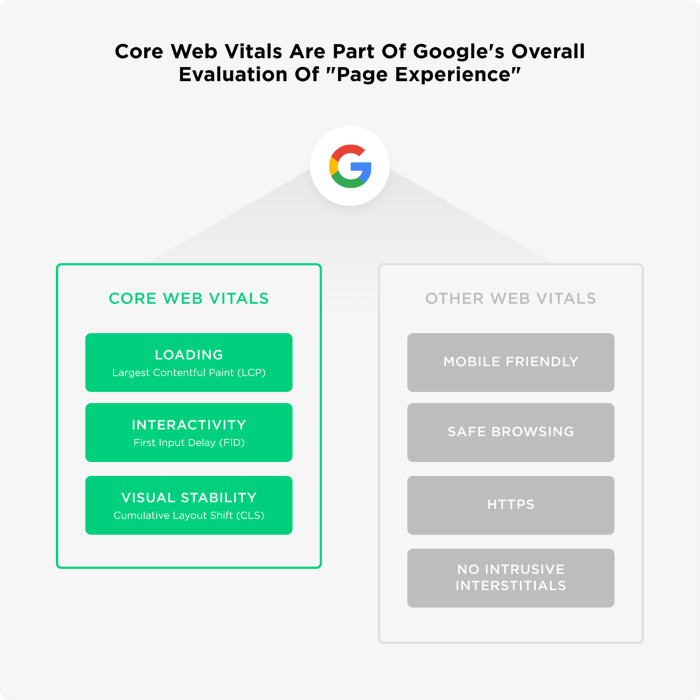
One useful benchmark here is Core Web Vitals, Google’s set of performance metrics that directly influence rankings. On average, only 53% of websites on the internet have a good Core Web Vitals score for desktop, and just 41% have a good score on mobile. That means more than half of all websites are actively underperforming on the very metrics Google uses to evaluate user experience. If your competitors are in that group, a faster site is a genuine ranking advantage.
Speed is one of the few technical SEO factors where improvements can have a near-immediate effect on your search engine rankings. It’s worth taking seriously.
The Real Cost Of A Slow Website
Let’s talk about the direct business impact because this is where the argument becomes undeniable.
The data from real companies:
The pattern is consistent across every industry: faster websites generate more revenue. You can keep adding traffic to a slow website, but you’re losing conversions the whole way through.
If you’re running paid ads, every dollar you spend driving traffic to a slow website is a dollar working against itself. Ads are a great short-term catalyst for revenue. They can quickly put your business in front of the right people. But if those people land on a site that takes 6 seconds to load, your ad spend is funding a bad first impression. Speed isn’t just an SEO problem. It’s a paid media problem, too.
Beyond revenue, there’s the customer loyalty and reputation piece. A bad user experience sticks with people. Once your brand gets associated with a frustrating website, it’s hard to shake. And dealing with unhappy customers costs money. Your support team bears that burden, and it adds up.
Seven Ways To Improve Website Speed
Most website speed problems are fixable without a full rebuild. Start here.
1. Optimize Your Images
Images are often the biggest drag on load time. Websites accumulate image files over time, especially blogs that feature an image on every post. Images typically account for 50-70% of total page weight, so this is where your biggest gains usually are. Use tools like ShortPixel to compress file size before uploading. Enable lazy loading for images and videos so content loads only when it enters the viewport. This dramatically reduces initial page load time without affecting what the visitor sees.

Audit every image on the site in one pass, not post by post. Images are usually the heaviest thing on a page, so one bulk compression run tends to do more for load time than any plugin you'll install. Do that first, then test again.
2. Minify Your CSS, JavaScript, And HTML
Every extra character in your code (spaces, comments, unused tags) adds to what the browser has to download and process. Minifying your CSS, JavaScript, and HTML removes that bloat. Most CMS platforms have plugins that handle this automatically. This is one of the easier wins in speed optimization.
3. Use A Content Delivery Network (CDN)
A content delivery network stores copies of your static assets across servers around the world. When someone visits, the server closest to them delivers the content. Shorter distance equals faster delivery. Cloudflare is one of the most widely used CDNs and has a solid free tier. If you’re not using CDNs, this is one of the higher-impact fixes available to website owners.
4. Enable Browser Caching
Browser caching stores elements of your site locally on a visitor’s device after their first visit, so returning visitors don’t have to reload everything from scratch. It improves load times for repeat visitors and contributes to better overall performance without additional infrastructure costs.
5. Upgrade Your Web Hosting
Cheap web hosting is one of the most common and overlooked culprits behind a slow website. Shared hosting means your site competes for server resources with dozens of other sites. If you’ve done everything else and load times are still suffering, your host may be the bottleneck. It’s worth the upgrade.
6. Reduce HTTP Requests
Every element on your page (images, scripts, stylesheets) creates an HTTP request. More requests mean longer load time. Audit your pages, remove unnecessary elements, combine files where you can, and be selective about third-party scripts (chat widgets, tracking pixels) that quietly add requests without much value.
7. Use Plugins Strategically
For WordPress users, plugins can automate a lot of the speed optimization work: caching, file compression, and more. But don’t stack too many of them. Too many plugins slow things back down and can cause conflicts or security issues. Pick a few well-maintained options and keep an eye on the impact.
The Best Tools To Measure Website Speed
Before you fix anything, you need to know where you stand. These three tools cover your bases:
| Tool | What It Does |
|---|---|
| Google PageSpeed Insights | Free performance audit with specific fix recommendations for mobile and desktop |
| GTMetrix | Full page load breakdown with actionable improvement suggestions |
| Pingdom | Monitors uptime and identifies specific slow-loading elements |
Test regularly, especially after making changes, to confirm improvements are sticking and that your site is running smoothly.
Can You Afford To Have A Slow Website?
Website speed has become a baseline expectation, not a differentiator. Visitors expect your site to load in seconds. Search engines expect it too.
Paid ads are the short-term engine. They drive traffic, generate quick wins, and keep the pipeline moving while you build. SEO is the long-term asset that keeps delivering qualified traffic without a media budget behind every click. Both matter. But neither works the way it should if your website is slow.
Speed directly affects your conversions, your search rankings, your customer loyalty, and ultimately your revenue. A fast site makes your ads more efficient and your SEO more effective. Start with Google PageSpeed Insights, identify your biggest problem areas, and work through the list above. Your website is your hardest-working salesperson. Make sure it’s not the thing slowing down the whole operation.
Frequently Asked Questions
Run it through Google PageSpeed Insights. It’s free, takes 30 seconds, and gives you scores for both mobile and desktop with specific fixes. If your site takes more than 3 seconds to load on mobile, you’re losing a big share of visitors before they read a single word.
Yes, but it’s more of a tiebreaker than a primary driver. Core Web Vitals are an official Google ranking factor, and slow pages rank lower and get crawled less often. Relevance and content quality still lead. Speed won’t outrank better content, but it will keep you from losing ground to a competitor whose content is just as good and whose site loads faster.
Your internet connection is probably faster than the average visitor’s, and your browser is likely loading a cached version of the site. Always test from an outside tool like Google PageSpeed Insights, not your own browser.
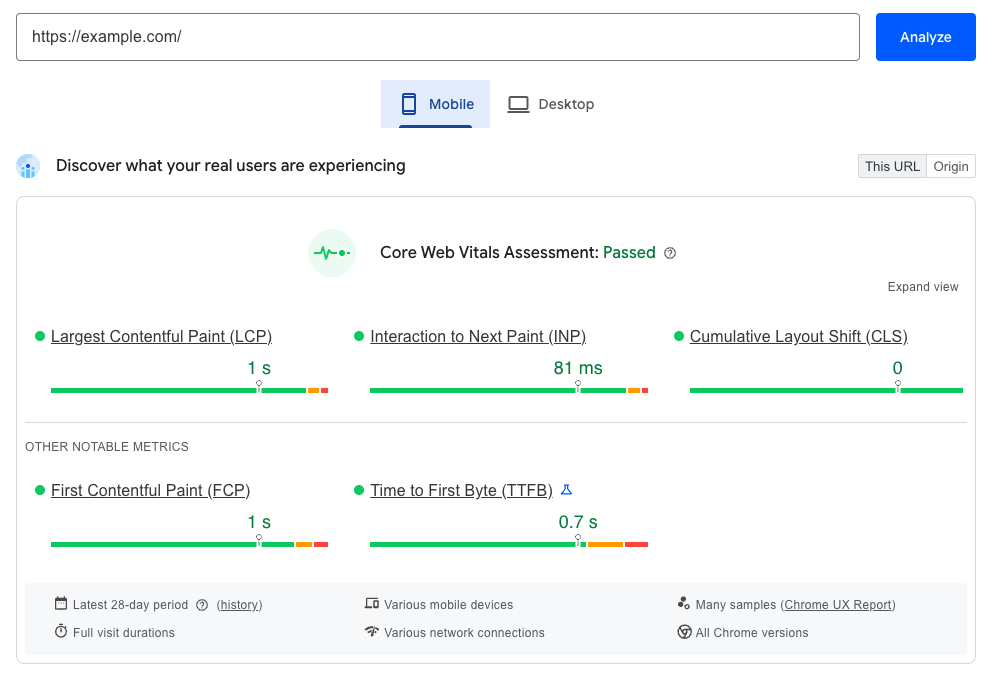
On Google PageSpeed Insights, 90 and above is good, 50 to 89 needs work, and below 50 is poor. Your PageSpeed score doesn’t directly affect rankings, though. Only real user data does. What actually matters are your Core Web Vitals thresholds: LCP (how fast the main content shows up) under 2.5 seconds, INP (how fast the page responds to a tap or click) under 200ms, and CLS (how much the layout jumps around) under 0.1.
Yes, by a lot. Mobile users are on slower connections, using less powerful devices, and have even less patience for slow load times. Google also uses mobile-first indexing, which means your mobile version is what gets evaluated for rankings.
At minimum, after any major site change: a new theme, plugin installs, large content updates, or anything touching your code. Beyond that, a monthly check is a reasonable habit. Sites slow down over time as content piles up and third-party scripts get added.
Yes. In Google Ads, your landing page experience feeds directly into your Quality Score, which decides how much you pay per click and where your ads appear. A slow landing page raises your cost per click and pushes your ads down the page. Speed isn’t just an SEO concern. It makes paid traffic more expensive too.
Technical improvements can show up faster than most SEO changes, sometimes within a few weeks of Google recrawling your pages. Conversion rate improvements tend to appear even sooner, since a faster site gives visitors a better experience right away.
A Slow Site Is Costing You Leads. Let's Find Out How Many.
- What is actually slowing your site down, in plain English
- Where your leads are leaking, from page speed to the form
- A 90-day plan you can run with or without us
