


During a routine check of a nonprofit’s site after a rebuild, we found its most visited page marked as a duplicate of another page. The same check turned up a robots rule blocking every image and PDF on the site, including the downloads people came for.
Nobody had done anything wrong on purpose. Two settings changed during the rebuild and nobody noticed. Cory fixed both the same day: “I fixed both of these today rather than wait, because they were critical fixes.”
That’s technical SEO for SaaS in a sentence. Most of it is checking that Google can find, read and trust the pages you already have, then fixing what’s broken in the order that costs you the most. This guide is for the marketing lead who doesn’t write code but has to tell the dev team what to fix first.
Key Takeaways
Fix in order of what it costs you. A pricing page Google can't index matters more than a missing schema tag.
Robots.txt doesn't keep a page out of Google. Google's own documentation says so; use noindex for that.
Check what Google sees, not what you see. If key content only appears after JavaScript runs, Google has to render it first, and that can wait in a queue.
A subdomain isn't a penalty, but it's more work. Google says either a subdomain or a subfolder is fine; the link plan matters more than the address.
Migrations are where SaaS sites lose the most. Cory's team at Comcast spent almost a year checking redirects after a domain move.
Brief developers with what's wrong, what it should be, and how to check. A one-line ticket beats a 40-page audit nobody reads.
What Technical SEO Means For A SaaS Website
Technical SEO is the work that lets search engines find, read and index your pages. It’s the technical foundation the rest of your SaaS SEO sits on: keyword research, on-page SEO and content don’t help much if search engines can’t read the pages. For SaaS companies, it’s harder than for a small business because a SaaS website is usually four sites that look like one:
- The marketing site: home, pricing, features, comparisons, use cases.
- The app: logged-in pages that should almost never be in Google.
- The docs or help center: often the most useful search content you have.
- The blog: sometimes on the main site, sometimes on a subdomain, sometimes on another platform.
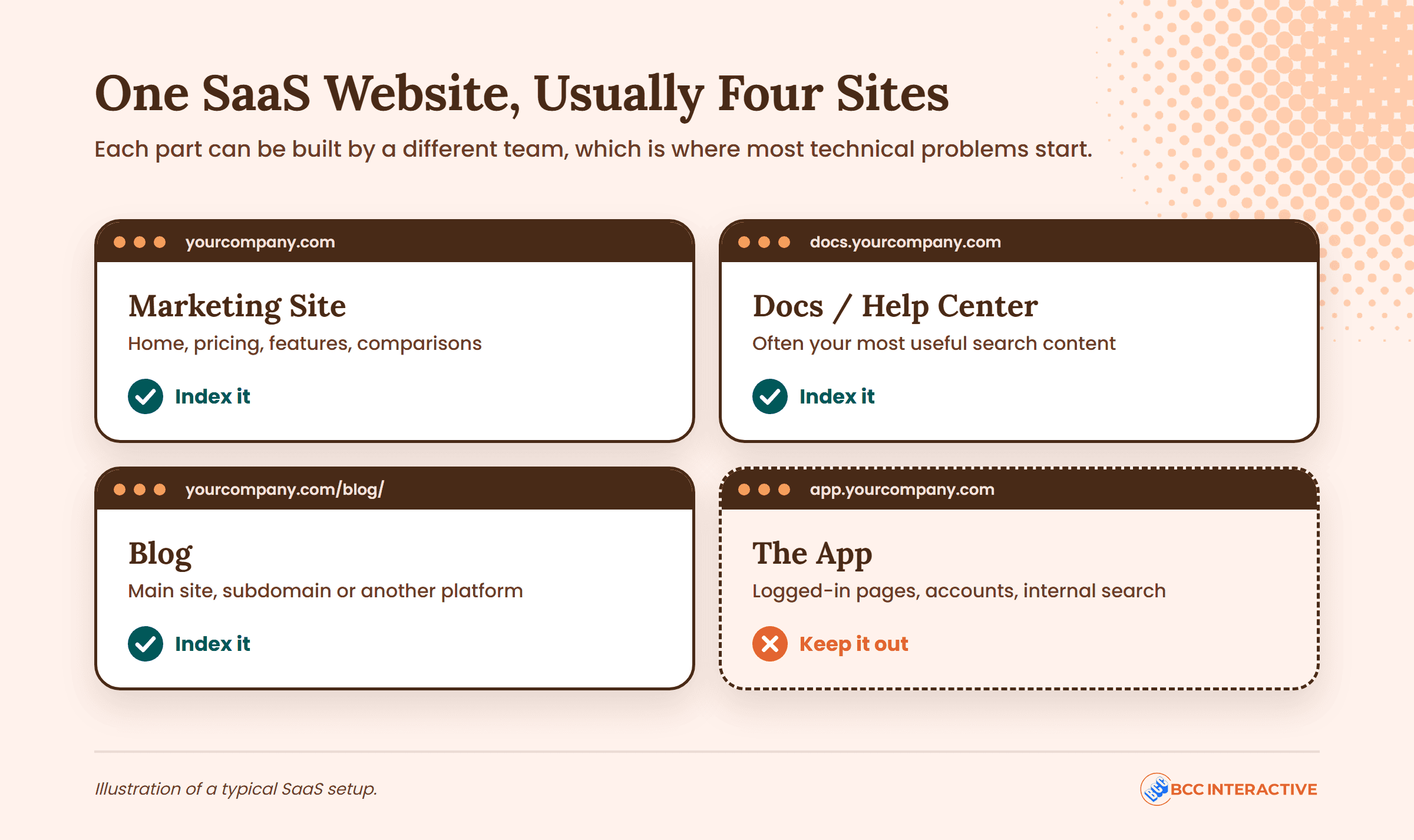
Each one can be built by a different team on a different system. That’s where most SaaS technical SEO issues come from, and why B2B SaaS teams so often find the same technical issues in every technical audit. Our guide to SEO for SaaS covers the basics of each; this piece covers what to fix first.
The Fix Order
We work through a SaaS site in this order, from the problems that cost the most rankings, organic traffic and demos to the ones that cost the least.
| Issue | What it costs you | How to check | Who fixes it |
|---|---|---|---|
| 1. Pages Google can't index | Your best pages don't show up at all | Search Console Page indexing report; URL Inspection | Developer or whoever manages the CMS |
| 2. Pages Google can't render | Google sees an empty or partial page | URL Inspection, "View crawled page" | Developer |
| 3. Blog or docs split off from the main site | Extra setup and weaker links to your money pages | Where the blog lives; how it links to the main site | Marketing and developer together |
| 4. Duplicate pages | Google picks a version you didn't want | URL Inspection, "Google-selected canonical" | Developer |
| 5. A broken sign-up path | Visitors arrive and can't convert | Click through every trial and demo button yourself | Developer and marketing |
| 6. Slow pages | Visitors leave before the page loads | Search Console Core Web Vitals report; PageSpeed Insights | Developer |
| 7. Structured data that doesn't match the page | Missed rich results; mixed signals | Google's Rich Results Test | Developer |
1. Pages Google Can't Index
Indexing is a search engine adding a page to its results. A page that isn’t indexed can’t rank, however good it is. This is the most expensive of the SEO mistakes on this list, because nothing else you do for the page counts until it’s fixed.
Three settings cause most of it:
- A noindex tag left on after a page moved from staging to live. It tells Google not to show the page.
- A robots.txt rule that blocks the page. Robots.txt tells Google what not to crawl, but Google’s documentation is clear that “it is not a mechanism for keeping a web page out of Google.” A blocked page can still show up if other sites link to it, just without a proper description.
- A canonical tag pointing somewhere else. That tag tells Google which version of a page is the main one. On the nonprofit’s site, the most visited page pointed to a different page as its main version, so Google was being told to favor the wrong one.
One trap catches a lot of teams: if you want a page out of Google, use noindex and leave the page crawlable. Google’s own rule is that “for the noindex rule to be effective, the page or resource must not be blocked by a robots.txt file.” Block it in robots.txt and Google never sees the noindex.
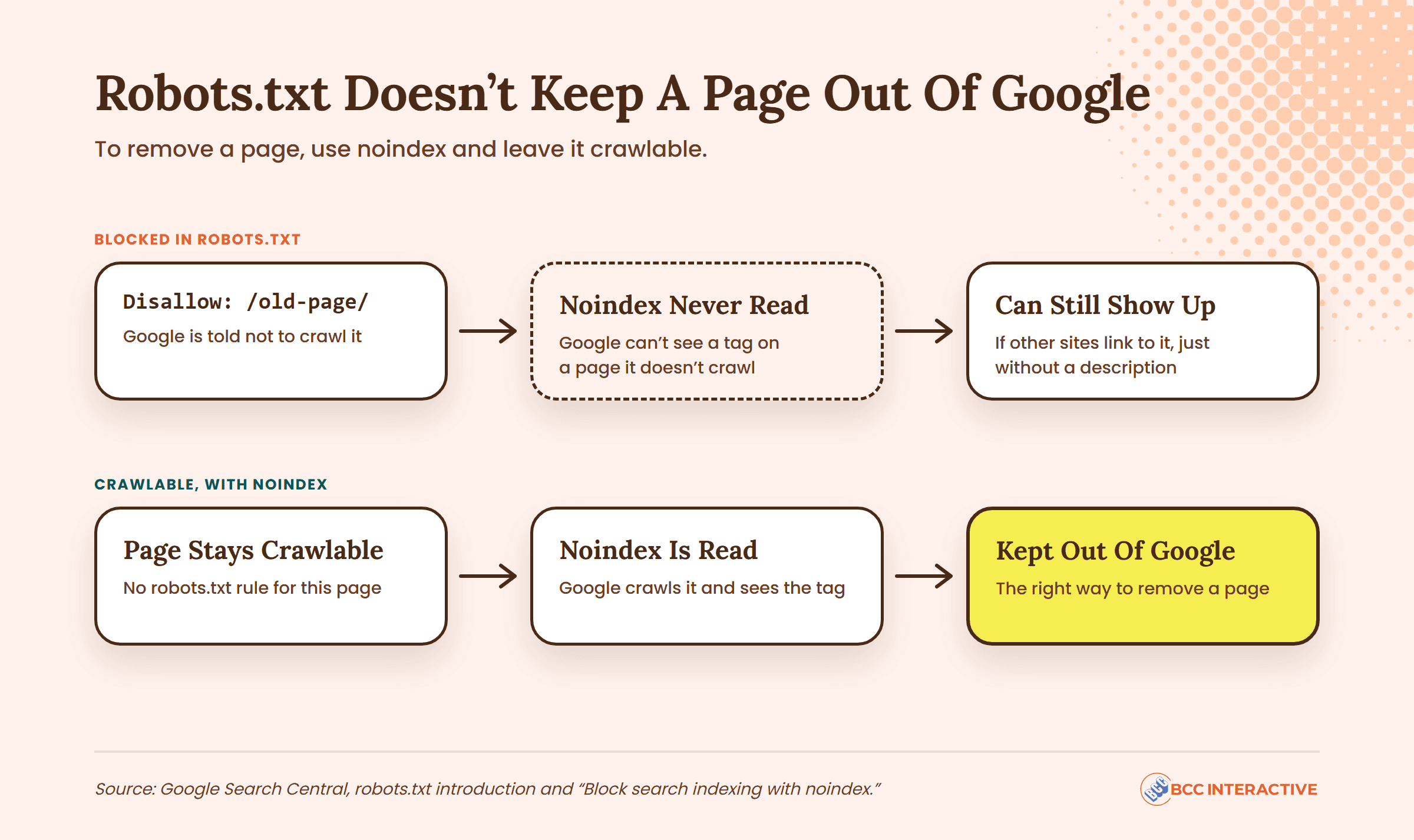
For SaaS companies, the most common version is the app. Logged-in pages, account pages and internal search results end up in Google’s index, and real marketing pages end up blocked by a rule meant for the app.
2. Pages Google Can't Render
Rendering is a search engine running your page’s code to see what a visitor would see. Many SaaS marketing sites are built with JavaScript frameworks that put the content on the page only after scripts run.
Google says it processes JavaScript pages in three phases: crawling, rendering and indexing. Pages can wait in a queue before they’re rendered, and the page “may stay on this queue for a few seconds, but it can take longer than that.” Google’s own advice is that “server-side or pre-rendering is still a great idea because it makes your website faster for users and crawlers, and not all bots can run JavaScript.”
That last part matters more now that AI platforms send their own crawlers to read the web. If a crawler doesn’t run JavaScript, content that only appears after scripts run isn’t there for it.
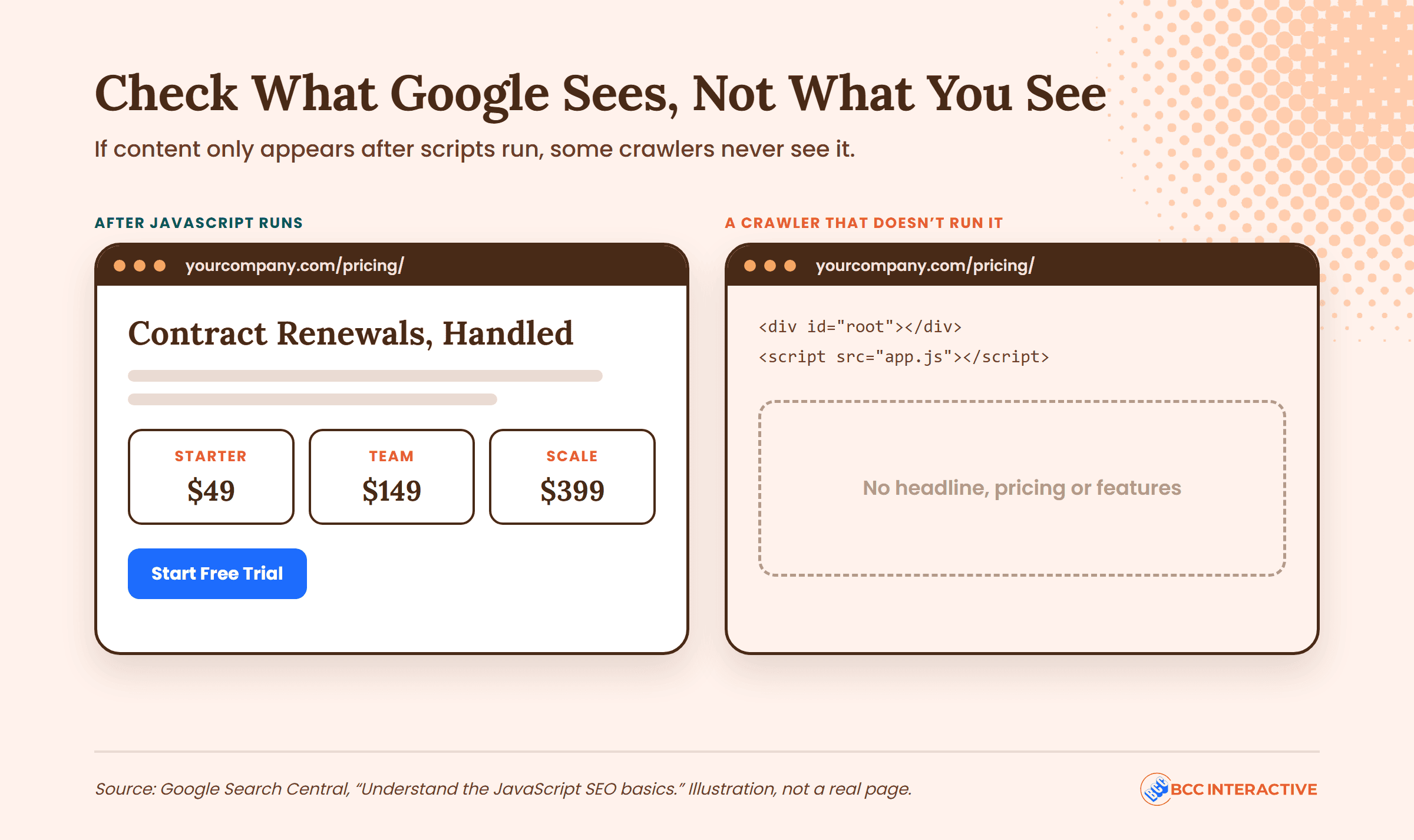
The check: open Search Console’s URL Inspection tool on a key page, run a live test and look at the rendered page. If your headline, pricing or feature copy isn’t there, Google isn’t seeing it reliably either.
3. Your Blog Or Docs On A Subdomain
A subdomain is a separate address in front of your domain, like blog.yourcompany.com. A subfolder sits inside the main site, like yourcompany.com/blog/. SaaS companies end up with subdomains because the blog or docs run on a different platform from the SaaS product’s marketing site.
There’s a lot of folklore about this. Google’s own statements are more measured:
- John Mueller of Google said in 2016 that subdomains are “not something that would kind of like improve or hurt rankings” and that “It’s more a matter of us figuring that out” (via Search Engine Roundtable).
- In 2022 he added that “If you want the content to stand on its own, then a subdomain is a good match,” and listed the side effects: “verification in search console, tracking in analytics, DNS, hosting, security” (via Search Engine Roundtable).
- Google’s tools do treat a subdomain as its own unit. It needs its own Search Console property, and Google sets site names per “domain or subdomain.”
Ahrefs’ Patrick Stox adds the useful part: a subdomain may be treated as separate “if you’re not treating the subdomains as part of your main website (read as not connecting them with internal links).”
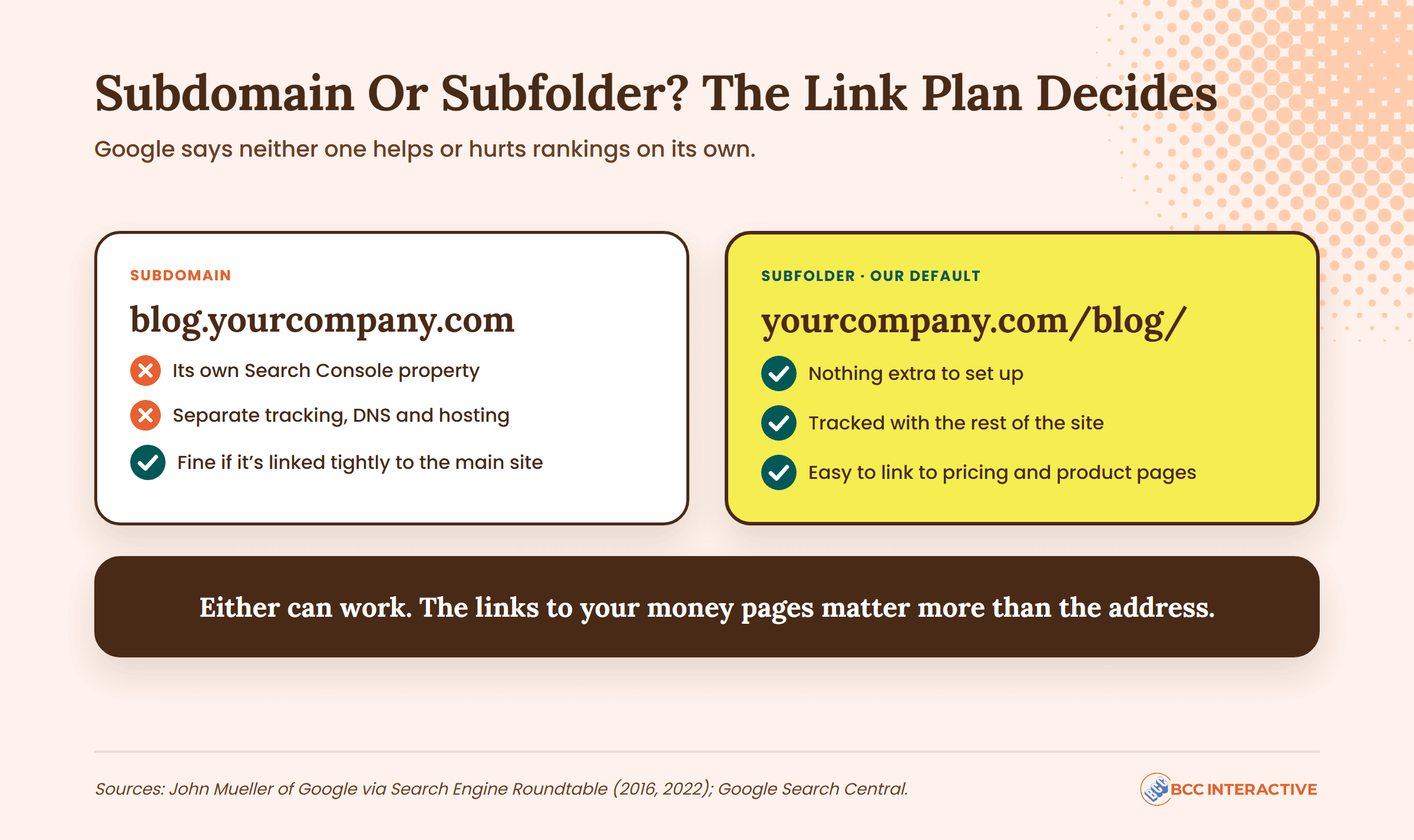
Cory’s rule, from an email to a client weighing a separate microsite: “The URL directly isn’t what decides this either way. The link and site architecture plan is.”

For a SaaS blog we default to a subfolder. Not because Google punishes subdomains, but because a subfolder is less to set up, less to track, and easier to link tightly to your pricing and product pages. If your blog already lives on a subdomain and it's well linked, moving it is a migration with real risk. Fix the links first.
4. Duplicate Pages Competing With Each Other
SaaS sites make duplicates without trying: tracking parameters on URLs, tag and category pages on the blog, the same feature page under two paths, or both the http and https version of the homepage.
We’ve seen a statewide association with two homepages in Google’s index, one on http and one on https, because a redirect was set up but didn’t finish the job. Brand searches were split between them.
Duplicates split your rankings between pages. The fix is to pick one version of each page and point the others at it with a redirect or a canonical tag. Google calls a canonical tag “a strong signal” that a URL should be the main version, not a command, and it makes its own call on duplicates. URL Inspection shows both the canonical you set and the one Google chose. When they don’t match, find out why.
5. A Sign-Up Path That Breaks
This one isn’t strictly SEO, but it’s where the organic traffic you worked for goes to waste, and it hits SaaS sales directly. Click every trial, demo and pricing button on your site as if you were a buyer. Check that each one goes where the button says, on desktop and on a phone, and that the form actually submits.
Redesigns and new releases break these more often than anyone expects, and nobody notices until someone asks why demos dropped.
6. Speed And Core Web Vitals, Without Chasing A Perfect Score
Core Web Vitals are Google’s measures of the user experience of loading and using a page. Google’s targets are a Largest Contentful Paint within the first 2.5 seconds, an Interaction to Next Paint under 200 milliseconds and a Cumulative Layout Shift under 0.1.
Use Search Console’s Core Web Vitals report, which is based on real visitors, to find the page types that fail. Fix those templates. Don’t spend developer weeks moving a PageSpeed score from 85 to 100 while your pricing page isn’t indexed. More on that in why page speed matters.
7. Structured Data That Matches The Page
Structured data, also called schema markup, is code that labels what’s on a page (an organization, a software product, an FAQ) so search engines don’t have to guess. For a SaaS site, Organization and SoftwareApplication markup are the usual starting points.
The rule is simple: the markup has to describe what’s actually on the page. Markup that claims reviews or prices the page doesn’t show does more harm than none. Test it with Google’s Rich Results Test.
Migrations And Redesigns: Where SaaS Sites Lose The Most
SaaS companies rebrand, replatform and restructure often. Every one of those is a migration, and migrations are where we see the biggest losses.
When Comcast rebranded as Xfinity, the site moved from Comcast.com to Xfinity.com. “It took us almost a year to sit every single day and make sure all of the redirects were correct,” Cory says of running the SEO team there.
The other side of it: a physical therapy group relaunched its site with new URLs and no redirects from the old ones. Its “page not found” page became the sixth most visited page on the site.
FilmTrack went through a real site migration during our engagement and kept growing through it: from 335 to 885 ranking keywords between January 2018 and December 2023 (Semrush).
"Thirty minutes and I had a clearer picture of our search problem than after two months of internal meetings."
Google’s own guidance for a move: use permanent redirects, “such as 301 and 308,” and “keep the redirects for as long as possible, generally at least 1 year.” Map every old URL to its new home before launch, not after. Our guide to redesigning without losing SEO has the full process.
Redesigning Or Replatforming? Check This First
The 39 checks we run on every website redesign so the new site keeps the rankings, links and leads the old one earned.
Get the Redesign Survival ChecklistHow To Run A SaaS Technical SEO Check Without Being A Developer
You don’t need to read code to find most of these problems, and you don’t need expensive SEO tools. Google Search Console is free and shows most of what matters:
- Page indexing report: which pages aren’t indexed and why.
- URL Inspection: what Google sees on one page, and which version it chose as the main one.
- Core Web Vitals: which page types are slow for real visitors.
- Sitemaps: whether your sitemap is read and whether its URLs are indexed.
A site crawler (Screaming Frog is the common one, and it’s free up to 500 URLs) fills in the rest: broken links, redirect chains, missing titles and noindex tags.
Three checks for this week:
1. Run URL Inspection on your pricing page and confirm it's indexed
2. Search site:yourdomain.com/app to see if app pages are in Google
3. Click every "Start trial" and "Book a demo" button on your phone
How To Hand Fixes To Your Dev Team
A 40-page audit PDF rarely gets acted on. Developers fix tickets, not reports. Write each issue as a ticket they can act on without a meeting.
Write Every Fix Like This
What's wrong: The page has a noindex tag, so Google won't show it.
Currently: meta robots = noindex, follow
Set to: remove the noindex tag (or set index, follow)
How to check: Search Console, URL Inspection, "Indexing allowed?" says Yes after a live test
Priority: High, this is our main sales page
Developers can fix it, check it and close it without coming back to you with questions.
Put the highest-cost fixes first, one ticket per issue, and agree on who checks each one after it’s done. Then repeat the check every month or after every release. Regular technical SEO monitoring catches the next broken setting before it costs you months of demos.
Fix What Google Can't See Before You Polish What It Can
Technical SEO for SaaS is mostly about order. Make sure your money pages are indexed and readable first, keep the blog and docs tightly linked to the main site wherever they live, protect every URL in a migration, and only then worry about speed scores and markup.
Find Out What Google Can't See On Your Site
- Which of your key pages aren't indexed or rendered, and why
- Where your app, docs and blog leak authority from the marketing site
- A 90-day fix list your developers can start on

Frequently Asked Questions
Technical SEO for SaaS companies is the work that makes sure search engines can find, read and index a software company’s marketing site, docs and blog, while keeping the logged-in app out of search results.
Start with Google Search Console’s Page indexing report and URL Inspection on your key pages, then run a site crawler for broken links, redirects and noindex tags. Rank every issue by what it costs you, starting with pages that can’t be indexed.
Google says either can work. We default to a subfolder for a SaaS blog because it’s simpler to set up, track and link to the rest of the site. If yours is already on a subdomain, tightening the links to your main site comes before any move.
Not on its own. Google can render JavaScript, but pages can wait in a rendering queue and not every crawler runs it. Google recommends server-side or pre-rendering for that reason.
It depends on the fix and the site. Google has to recrawl a page before a change counts, and our guide to how long SEO takes covers the typical waits. A fix to an important, often-crawled page can show up within days; a site-wide migration usually takes much longer to settle.