


Most enterprise SEO advice is written for companies with a 40-person SEO department and a seven-figure tool budget.
You probably have a marketing team of four, a website with a few thousand pages nobody fully owns, and an IT ticket queue that treats “fix the redirects” the same as “change the font.”
That’s who this guide is for. Mid-market companies. Multi-location businesses. E-commerce brands with a big catalog. B2B companies with several product lines and a sales team that wants leads, not rankings.
Enterprise SEO is search engine optimization (SEO) applied to a website that’s too big for one person to manage page by page. The disciplines are the same whether you have 500 pages or 50,000. What changes is how much of the strategy has to run as a system instead of a to-do list.
I ran marketing teams at Comcast and Campbell’s before starting BCC Interactive. The lessons below come from watching SEO succeed and fail inside big organizations, then applying them to companies that can actually move fast.
Key Takeaways
Governance decides more than tactics. The two reasons enterprise SEO programs stall are that nobody owns the result and nobody can get a change published. Fix those before you buy a tool.
Crawl budget is a real constraint past about 10,000 pages. Google's own guide says sites with 10,000+ pages that change daily, or lots of "Discovered, currently not indexed" URLs, need to manage what Googlebot crawls.
Templates are where one fix pays off everywhere. Fixing one product or location template improves every page built on it, so audit templates before you audit pages.
Migrations are where enterprise sites lose years of work. Google says to keep redirects for at least a year and to change one thing at a time.
Analytics is the skill most teams are missing. Search Console only keeps 16 months of data, so an enterprise program exports it and reports by business unit, not by keyword.
Enterprise tools don't publish prices. Botify, BrightEdge, Conductor and seoClarity all sell on custom quotes, and most mid-market teams don't need one yet.
AI search is already in the enterprise budget. Conductor's January survey of 250+ enterprise executives found 94% plan to increase spending on answer engine optimization this year.
What Is Enterprise SEO, And Is Your Company "Enterprise"?
Enterprise SEO is the practice of improving search engine visibility across a large, complex website: thousands of pages, multiple teams touching it, and a change process that involves more than one person.
Notice what’s not in that definition: revenue, headcount, or a Fortune 500 logo.
The test is operational, not financial. You’re doing enterprise SEO if any of these are true:
- Your site has more pages than anyone could review by hand in a quarter
- Pages are generated from templates (products, locations, categories, listings)
- More than one team can publish or change pages
- A change requires a developer ticket and a release window
- Several locations, brands, regions or product lines compete for attention on the same domain
A 30-location home services company with 2,000 pages has enterprise SEO problems. So does a B2B software company with a 5,000-page help center and a product team that publishes without talking to anyone. The “corporate SEO” label people search for means the same thing: SEO where coordination is the hard part.
If you sell software, a longer sales cycle adds its own wrinkle. Our guide to SEO for SaaS covers that.
Enterprise SEO vs Traditional SEO
The tactics overlap almost completely. The difference is what breaks when you get it wrong.
| Traditional (small-site) SEO | Enterprise SEO | |
|---|---|---|
| Pages | Dozens to a few hundred, each edited by hand | Thousands to millions, mostly generated from templates |
| Who can change a page | One owner, same day | Marketing, product, IT and regional teams, through a release process |
| Biggest risk | Thin content, weak authority | Crawl waste, duplicate pages, a bad migration |
| Keyword research | A list of target terms per page | Keyword groups mapped to templates and page types |
| Internal linking | Manual, page by page | Rules built into navigation, templates and modules |
| Reporting | Rankings and organic traffic | Revenue and leads by business unit, location or product line |
| Main skill | Writing and on-page basics | Technical SEO, data analysis and getting buy-in |
| Tools | Search Console, a crawler, a keyword tool | The same, plus log files, a data warehouse and sometimes an enterprise SEO platform |
One more difference. On a small site, a mistake costs you a page. On an enterprise website, a mistake in a template or a robots.txt file costs you a whole section, and you may not notice for a month.
What Teams Are Required To Execute An Enterprise SEO Strategy?
This is the question people ask most, and the one most guides skip. Enterprise SEO fails for two reasons, and neither is a tactic. Nobody owns the result, or nobody can get a change published.
You don’t need a 40-person department. You need these roles filled, even if some are the same person:
An SEO lead who owns the number. One person accountable for organic leads or revenue, with the authority to set the roadmap. If SEO is “part of” someone’s job and nobody can say what the goal is, that’s the first fix.
A developer with SEO hours. Templates, redirects, site speed, structured data and crawl fixes all land in a developer’s queue. Agree on a standing allocation, even a few hours a sprint, so SEO work doesn’t lose to every feature request.
Content owners by section. Product pages belong to product marketing. Location pages belong to operations. Resources belong to content. Each owner gets a brief, a template and a checklist.
Analytics. Someone who can join Search Console, Google Analytics 4 (GA4) and CRM data and answer “what did organic search produce last quarter, by business unit?” This is the skill most mid-market teams are missing, and the one that keeps the budget.
An executive sponsor. Not someone who “supports SEO.” Someone who will say no to a redesign that launches without a redirect plan.
Governance is the set of rules that keep those people from stepping on each other. Write down who approves new pages, who can change a template, what every page must have before it goes live (title, meta description, canonical, internal links, structured data), and how an SEO issue gets into the development queue.
Three Questions To Settle Before You Touch A Single Page
- Who owns the organic revenue number, and what is it this quarter?
- What's the path from "SEO found a problem" to "a developer fixed it," and how many days does it take today?
- What does every new page need before it can publish, and who checks?
If you can't answer all three in one sentence each, the tactics below will stall in someone's queue. Settle the answers in one meeting, write them down, and the rest of this guide gets a lot easier.
Enterprise Technical SEO: How To Keep A Big Site Crawlable
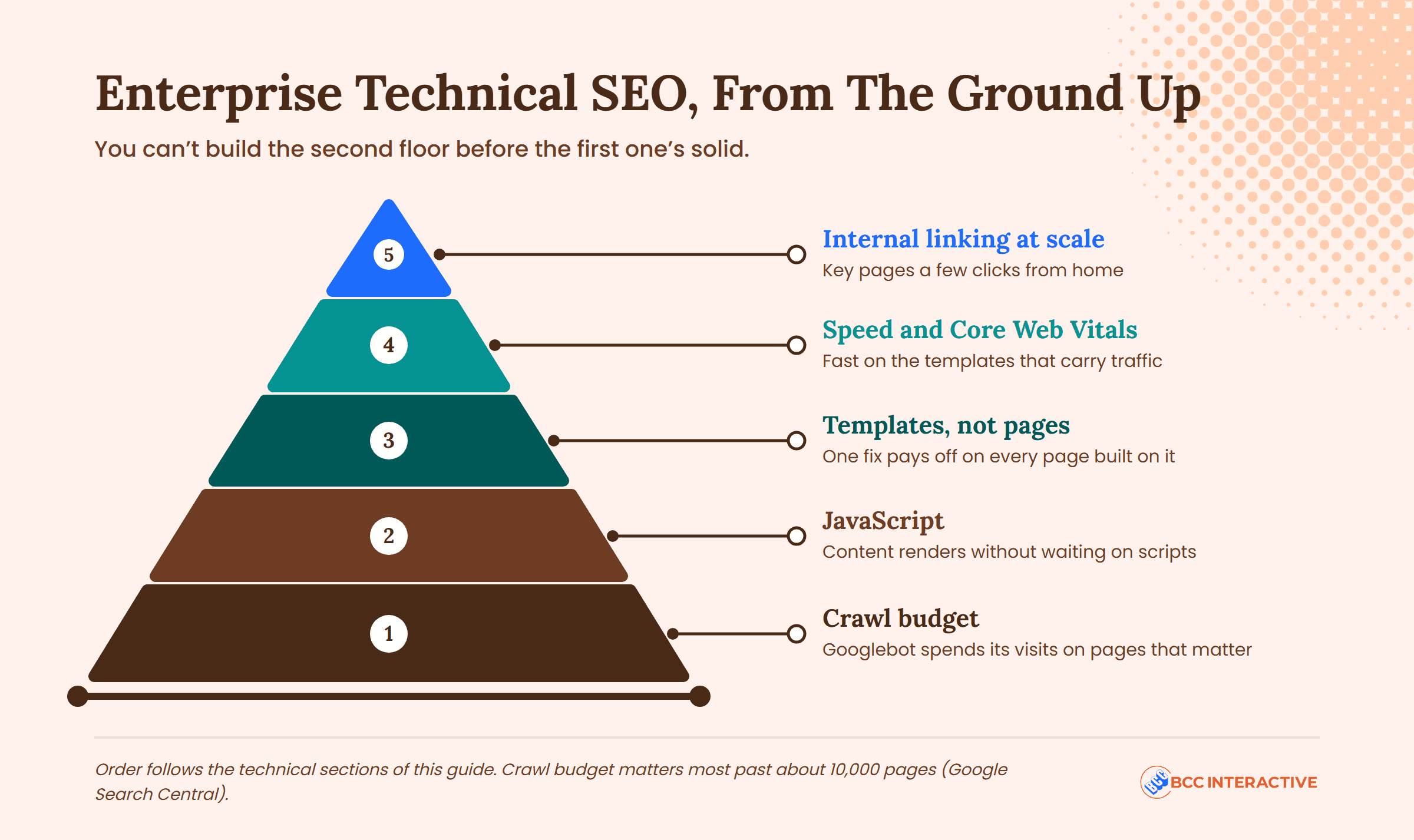
Technical SEO is everything that affects whether a search engine can find, crawl, render and index your pages. On a small site you can get away with ignoring it. On a big site it’s where most of the lost organic traffic lives.
You can’t build the second floor before the first one’s solid.
Crawl Budget
Crawl budget is the number of URLs Google can and wants to crawl on your site in a given period. Google’s guide to managing it, updated in July, says it matters for sites with roughly a million pages that change weekly, sites with 10,000 or more pages that change daily, and any site with a lot of URLs stuck in “Discovered, currently not indexed” in Search Console.
That third one catches a lot of mid-market sites. Google sets the budget from two things: how much crawling your server can handle without slowing down (crawl capacity), and how much Google wants to crawl based on how popular and how stale your pages are (crawl demand).
The fixes Google recommends are the ones we start with on every large site:
- Consolidate duplicate pages so crawling goes to unique content
- Block low-value URLs (internal search results, endless filter combinations, tracking parameters) in robots.txt, not with noindex, because Google still has to fetch a noindex page to read it
- Return a 404 or 410 for pages that are gone instead of redirecting everything to the homepage
- Fix soft 404s, pages that say “nothing here” but return a 200 status, so Google keeps crawling them
- Keep XML sitemaps current, with a lastmod date on pages you actually updated
- Cut redirect chains and make pages faster, because a faster server gets crawled more
Faceted navigation (the filters on category pages, like size, color and price) is the biggest crawl waste on e-commerce sites. Google’s guidance is direct: if the filtered URLs don’t need to rank, block them in robots.txt. Canonical tags and nofollow help a little but are, in Google’s words, less effective in the long term. Return a 404 for filter combinations with no products.
Templates, Not Pages
Enterprise sites run on templates: product, category, location, article. When you fix the title tag logic on the location template, you fix 300 pages at once.
So the audit order is templates first, then the 50 pages that matter most, then everything else. Check each template for:
- A title and meta description pattern that reads naturally, with the variable (city, product name) early in the title
- One H1, a logical heading structure, and the unique content block above the fold
- Canonical tags that point to the right version
- Structured data for the page type (Product, LocalBusiness, FAQ, Article)
- Internal link modules that link to related pages, not just the homepage and the parent category
- Mobile layout, because Google finished moving to mobile-first indexing in October 2023 and now evaluates the mobile version of every site
Speed And Core Web Vitals
Core Web Vitals are Google’s three page experience measurements. A page passes if, at the 75th percentile of real visits, the largest element loads in 2.5 seconds (LCP), the page responds to a tap or click within 200 milliseconds (INP, which replaced the older FID metric in 2024), and nothing jumps around as it loads (CLS under 0.1).
On an enterprise site, speed is a template problem too. The Core Web Vitals report in Search Console groups URLs by shared issue, which is the fastest way to see which template is slow. We wrote more on why page speed matters.
JavaScript
Many enterprise sites, especially headless builds, load content with JavaScript. Google can run it, but in a second step: pages go into a render queue after crawling and wait until resources are available. Google recommends server-side rendering or pre-rendering so the content is in the HTML the first time Googlebot arrives. Check what Google actually sees with the URL Inspection tool in Search Console, not by viewing source in your browser.
Internal Linking At Scale
Internal links tell a search engine which pages matter and how they relate. On a big site you don’t link by hand, you link by rule:
- Every page type gets a “related” module that links sideways (other products in the category, other locations in the region) and up (the category, the hub)
- Hub pages for each product line, service line or region link down to everything inside them
- Resource content links to the commercial page it supports, with descriptive anchor text
- Orphan pages (no internal links) get found in a quarterly crawl and either linked or removed
Site Migrations And Redesigns
Migrations (new domain, new platform, new URL structure) are where enterprise sites lose years of work in a week. Google’s site move guidance: map every old URL to a new one, use server-side 301 redirects with no chains, update canonicals and internal links on the new site, submit new sitemaps, and keep the redirects for at least a year. For a medium-sized site, Google says it can take a few weeks or more for the new URLs to replace the old ones in results. Larger sites take longer.
Google also says to change one thing at a time. Move the domain, then redesign. Not both on the same weekend.
We get the call after a redesign launched without a redirect plan more often than we’d like. If you’re planning one, read how redirects affect SEO first, and get SEO sign-off on the redirect map before the launch date is set.
Content Strategy At Scale Without Publishing Junk
The enterprise content problem isn’t “we need more content.” It’s usually that you have too much of it, nobody knows which pages do anything, and the pages that matter haven’t been touched since launch.
Map keyword research to page types, not pages. Research keyword groups for each template: what people search for when they want a product, a location, a category, a comparison. Decide which page type answers each group. That stops three teams from building three pages for the same search.
Build the unique content block into the template. A location page that only swaps the city name is a duplicate page with a different URL. Each template needs a slot for content that’s actually about that product, location or category, and each owner needs a brief that says what goes in it.
Refresh before you create. Pull the pages ranking in positions 8 to 20 for terms you care about from Search Console. Those pages already have Google’s attention. Update them for what the search wants now, improve the internal links to them, and measure 60 to 90 days later. That’s a cheaper win than a new page almost every time.
Prune on evidence. HubSpot removed about 3,000 outdated posts from its blog and reported that Google’s crawls of the blog fell about 20% and crawled URLs fell about 38%, so new content got crawled faster. HubSpot didn’t publish a traffic figure and said pruning was one of many factors, so treat it as a crawl story, not a traffic story. Our rule: before deleting anything, check backlinks and 12 months of traffic. Pages with links get redirected to the closest live page. Pages with neither get removed.
Pick formats on purpose. Product and location pages need specific, structured answers. Resources need the types of content that earn links and answer research-stage questions, written by people who know the subject.
Multi-Location And Multi-Brand SEO
If you have several locations, regions or brands, two things are true at once: each location needs its own page and its own Google Business Profile, and the whole set has to run on one system so you’re not maintaining 40 websites.
The structure that works is one domain, a location hub, and one page per location built on a template with real local content: hours, team, services offered there, reviews, directions, local photos. Each Google Business Profile links to its own location page, never the homepage. Our guide to local SEO for multiple locations covers the full setup, including the checklist we use.
If you operate in several countries or languages, hreflang is the tag that tells Google which version of a page to show in which market. Google accepts it three ways (HTML tags, HTTP headers, or your XML sitemap) and treats them the same. The part teams get wrong: every version must list itself and every other version, or Google may ignore the whole set. Use x-default for the page to show when no version matches.
Multi-brand companies have one more choice: one domain or several. One domain pools authority and is easier to govern. Separate domains make sense when the brands serve different customers and would never cross-link. Decide once, write it down, and don’t let a new brand launch reopen the question.
"The BCC team are experts in their field and consistently deliver better than expected results. We could not be happier with their performance. They feel like a part of our internal marketing team and have an exceptional understanding of our business needs and goals."
Authority At Scale: Links, Mentions And PR
Off-page SEO is everything that happens on other sites: links to yours, mentions of your brand, reviews. At enterprise scale, the mistake is treating it as a separate link-building project instead of something the company already does.
The highest-return sources are usually already in the building:
- Unlinked mentions. Press, partners and customers already write about you. Find the mentions without links and ask for one.
- PR. Your communications team earns coverage every month. Give them two target pages and the ask to link to them.
- Original data. Pricing trends, usage benchmarks, survey results. One annual report earns more links than a year of guest posts.
- Partners and locations. Suppliers, distributors, chambers of commerce, sponsorships. Each one is a relevant link nobody has asked for.
If the team needs a primer, start with how to build backlinks. What changes at scale is that the SEO lead coordinates the people already earning attention instead of sending cold outreach.
Enterprise SEO Analytics: Reporting That Keeps The Budget
The “enterprise SEO analytics” and “enterprise SEO dashboard” searches that land on this page usually come from someone who has to present to leadership next week. This section is for that person.
Know what each source does. Search Console shows how people find you: queries, impressions, clicks, average position, indexing status. GA4 shows what they do after they land: sessions, conversions, revenue. Neither replaces the other. We broke down Search Console vs Google Analytics if your team mixes them up.
Export Search Console data before it disappears. Search Console keeps 16 months of performance data. For year-over-year reporting beyond that, or query-level data on a big site, pull it out through the API or the bulk export into a warehouse like BigQuery and keep it yourself. Set this up on day one. You can’t get the history back later.
Check your GA4 retention setting. Standard GA4 properties keep event-level data for 2 or 14 months (up to 50 on GA4 360). It only affects explorations and funnel reports, not the standard reports, but if anyone builds custom analysis, 2 months is not enough.
Report SEO performance by business unit, not by keyword. Leadership doesn’t want 500 rankings. They want organic leads, pipeline and revenue by product line, region, location group or brand, against last quarter and last year. Build the dashboard around the way the company already reports revenue.
Track health metrics separately. Indexed pages vs. total pages, crawl errors, Core Web Vitals pass rate by template, pages with no internal links. These are for the SEO and development teams, not the board, and they’re the early warning before a traffic drop.
Use a free dashboard tool before you buy one. Looker Studio is free and connects to Search Console and GA4 out of the box.
One page for leadership. Organic leads or revenue by business unit, this quarter vs. last year, plus the three things you changed and the one thing you need from them. Everything else goes on page two.
- Revenue by unit
- YoY
- Top 3 changes
- One ask
Enterprise SEO Tools: What's Worth Paying For
An enterprise SEO platform is software built to manage SEO across very large sites: crawling millions of URLs, tracking thousands of keywords by market, reading server logs, and letting several teams work in one place. None of the major ones publish pricing.
| Tool | What it's for | Pricing | Who it fits |
|---|---|---|---|
| Google Search Console | Google's own data on queries, indexing and Core Web Vitals | Free | Everyone, first |
| Google Analytics 4 | What visitors do after they land; conversions and revenue | Free (360 tier is paid) | Everyone |
| Looker Studio | Dashboards connected to Search Console, GA4 and your warehouse | Free (Pro tier is paid) | Any team that reports to leadership |
| Screaming Frog SEO Spider | Desktop crawler; the standard for template and link audits | Free to 500 URLs, then £199 per user per year | Sites up to a few hundred thousand pages |
| Semrush or Ahrefs | Keyword research, rank tracking, backlinks, site audits | Subscription tiers; Semrush added an Enterprise platform in June 2024 | Mid-market teams and agencies |
| Lumar (formerly Deepcrawl) | Cloud crawler for very large sites, with log file analysis | Custom quote | Sites too big for a desktop crawler |
| Botify | Crawl, log file and performance data at very large scale | Custom quote | Large e-commerce and publishing sites |
| BrightEdge | Keyword data, content recommendations, AI search tracking | Custom quote | Large organizations with many SEO users |
| Conductor | Enterprise platform; acquired ContentKing and Searchmetrics | Custom quote | Enterprise content and marketing teams |
| seoClarity | Rank tracking, audits and AI answer monitoring | Custom quote | Large brands tracking many markets |
The first four rows cover most mid-market companies for the first year. Our list of free SEO tools goes deeper on what each free tier includes.

Don't buy an enterprise platform to prove SEO works. Buy one after it's working and the limit is your team's time. We've watched companies sign a five-figure platform contract, use it to run reports nobody reads, and cancel at renewal. Search Console, a crawler and a shared dashboard will get you through the first year. When your crawler can't finish the site or three teams need the same data, that's when a platform earns its price.
Where AI Search Fits In An Enterprise SEO Strategy
Answer engine optimization (AEO, also called GEO) is the work of getting your business named in answers from ChatGPT, Gemini, Perplexity and Google’s AI Overviews. Conductor’s survey of more than 250 senior executives at enterprise organizations, published in January, found 94% plan to increase AEO investment this year, and that enterprises put an average of 12% of their digital marketing budgets into it last year. Conductor sells an AEO platform, so read its numbers with that in mind, but the direction matches what we hear from clients.
The overlap with everything above is large. AI answers pull from pages that are crawlable, clearly structured, specific about who you serve and consistent across the web. The governance, template and content work in this guide is most of the AEO work too. What’s new is measurement: tracking whether and how AI assistants describe your company, by product line and market, next to your organic numbers.
How Long Does Enterprise SEO Take?
There’s no single answer, and anyone who gives you one is guessing. Ahrefs polled 3,680 SEO professionals on LinkedIn and X. The most common answer was three to six months, and Ahrefs’ own conclusion was “it depends.”
What it depends on is your starting point:
- An established site with targeting or content gaps can move in 60 to 90 days, because Google already trusts the domain and you’re fixing what it shows for
- An established site that needs bigger fixes (crawl waste, duplicate templates, a migration to clean up), or one in a crowded market, is more often 3 to 6 months
- A new domain, a new brand, or national terms against big competitors is usually 6 to 12 months or more
Enterprise sites tend to sit in the second group, not because the work is harder but because the queue is longer. The time from “found it” to “fixed it” is the real timeline. Lily Ray told Search Engine Land that trying to drive results quickly is one of the worst things you can do unless you only care about the next year or two. On a big site, that means fixing the system, not chasing one page. More on how long SEO takes by starting point.
In-House, Agency, Or Both?
Most enterprise SEO programs that work are a mix. The company owns the goal, the data and the relationships inside the building. Outside help fills the gaps in technical depth, analytics and hours.
| In-house team | Agency or consultant | Both | |
|---|---|---|---|
| Strengths | Knows the business, the politics and the CMS | Technical depth, pattern recognition from other sites, no hiring delay | Internal owner plus outside depth; the common setup |
| Weaknesses | Hard to hire for; one person can't cover technical, content and analytics | Needs an internal owner to get changes made | Requires a clear split of who does what |
| Best when | You can fund 3+ specialists and the developer hours | You need an audit, a migration plan or a program launched fast | You have one strong internal owner and a long roadmap |
If you’re evaluating an SEO agency for enterprise work, ask for a case study on a site of your size, ask how they get developer work prioritized at other clients, and ask what they’ll report on by month three. Answers about “deliverables” and rankings are a warning sign. Answers about revenue by business unit are what you want.
<!– GRAPHIC: a one-page “enterprise SEO operating system” diagram: five boxes (Own the number, Fix the path to a fix, Templates before pages, Protect the crawl, Report by business unit) in a quarterly loop. BCC design system, no tool logos. –>
The Discipline Is The Strategy
On a large site, SEO is a system you run, not a list you finish.
Own the number. Fix the path from problem to fix. Audit templates before pages. Protect the crawl. Refresh before you create. Report in the language the company already uses for revenue. Then do it again next quarter.
That’s enterprise SEO. It works at 500 pages and it works at 50,000. The companies that get it right aren’t the biggest. They’re the ones where someone actually owns it.
Frequently Asked Questions
The tactics are the same. Enterprise SEO is SEO on a website that’s too big for one person to manage page by page: thousands of pages, templates, several teams that can publish, and a release process for changes. The differences are governance (who owns what), technical scale (crawl budget, templates, migrations) and reporting by business unit instead of by keyword.
Start with governance: one owner for the organic number, a standing developer allocation, and a published checklist for every new page. Then audit templates, not pages. Fix crawl waste, duplicates and internal linking at the template level. Map keyword groups to page types. Refresh pages already ranking on page two before creating new ones. Report organic leads and revenue by business unit every quarter.
Technical SEO (crawling, rendering, templates, migrations), data analysis (joining Search Console, GA4 and CRM data), content strategy by page type, and the ability to get work prioritized across teams. The last one is the rarest. You don’t need all four in one person, but you need all four covered.
Reporting organic search performance across a large site the way the business already measures itself: leads, pipeline and revenue by product line, region or location group, compared to last year. It usually means exporting Search Console data (which only keeps 16 months), combining it with GA4 and CRM data, and building a leadership dashboard in a tool like Looker Studio, with technical health metrics tracked separately.
It depends on the size of the site, how much technical work is queued, and whether you’re buying an enterprise SEO platform. The platforms (Botify, BrightEdge, Conductor, seoClarity) all price on custom quotes. We build custom solutions scoped to the goal rather than a fixed enterprise package. For the broader picture, see our guide to what SEO costs.
Yes, and they’re often easier to run there because the queue is shorter. A mid-market company with a few thousand pages faces the same template, crawl and governance problems as a Fortune 500, with fewer people who have to sign off. The disciplines in this guide apply at 500 pages. You just need fewer meetings to put them in place.
Want To Know Where Your Site Is Losing Search Traffic?
- Where your site is wasting crawl and losing conversions, by template
- Who should own SEO in your org and what to ask your developers for first
- A 90-day plan you can run with or without us
